Azure DNS Private Resolver
Azure DNS Private Resolver is a fully managed, highly available DNS service that lets your spoke VNets and on-premises networks resolve Azure private DNS zones — without deploying and managing DNS virtual machines.
Before Private Resolver existed, enterprises had to run Windows Server DNS VMs in the hub to forward queries between on-premises and Azure. Private Resolver replaces that entirely with a managed service.
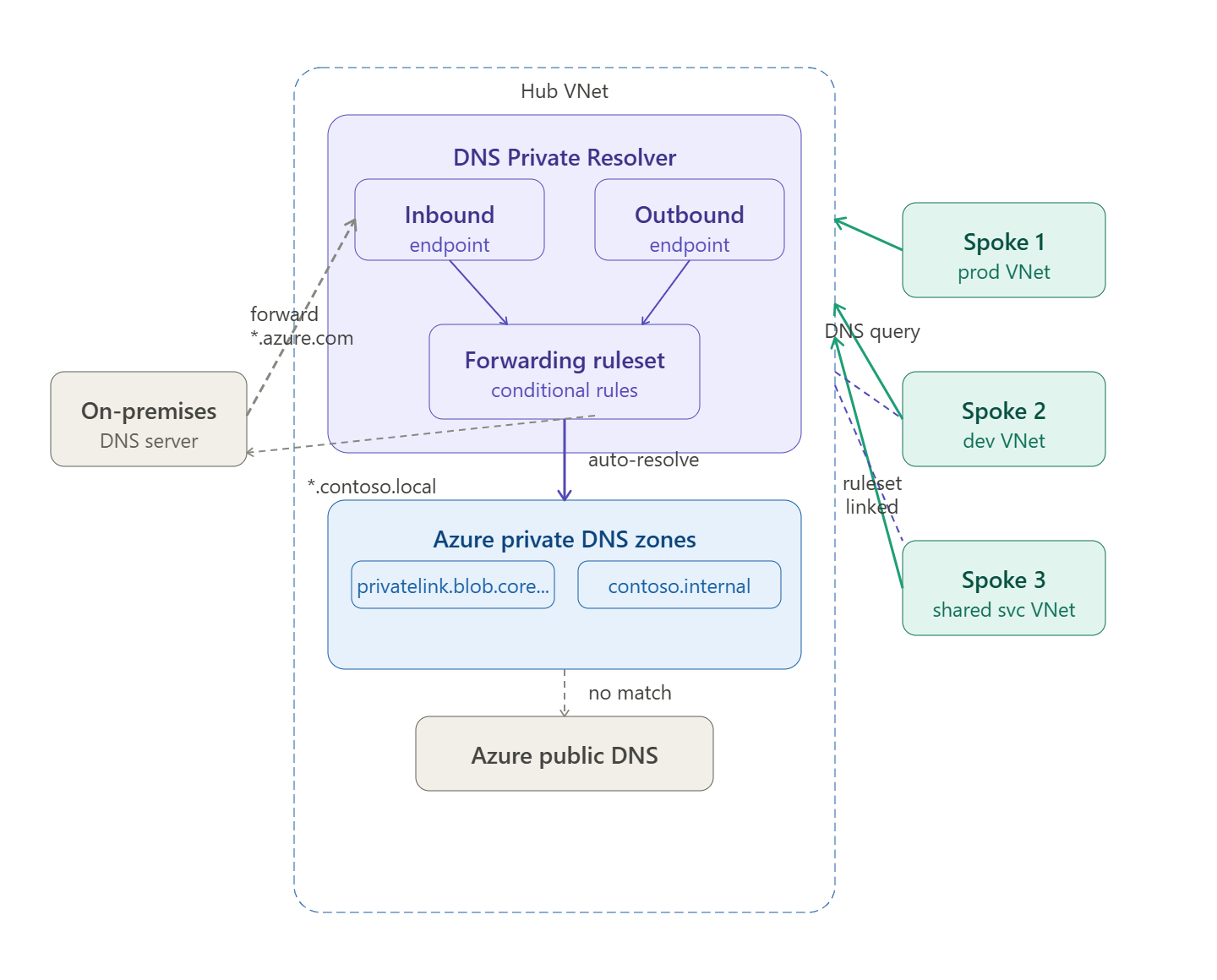
The Two Endpoints
DNS Private Resolver has two endpoint types, each deployed into a dedicated delegated subnet inside the hub VNet.
Inbound Endpoint
Receives DNS queries from outside Azure — from on-premises DNS servers or spoke VNets that point their DNS server setting directly at this IP.
- Gets a static private IP from your hub VNet subnet (e.g.
10.0.5.4) - Reachable over VPN Gateway or ExpressRoute from on-premises
- On-premises DNS servers forward specific zones (e.g.
*.privatelink.blob.core.windows.net) to this IP - Requires a dedicated
/28subnet named however you like (e.g.snet-dns-inbound)
Outbound Endpoint
Forwards DNS queries from Azure to external resolvers — typically to on-premises DNS servers for resolving internal corp domains like *.contoso.local.
- Also gets a private IP from a dedicated
/28subnet - Does not receive queries directly — works only through a Forwarding Ruleset
- Requires a dedicated subnet separate from the inbound endpoint subnet
Forwarding Ruleset
A Forwarding Ruleset is a collection of conditional forwarding rules attached to the outbound endpoint. You then link the ruleset to spoke VNets so those spokes inherit the forwarding rules automatically.
Example ruleset rules
| Domain | Forwarding target | Use |
|---|---|---|
contoso.local. | 192.168.1.10:53 (on-prem DNS) | Resolve internal corp names |
corp.contoso.com. | 192.168.1.10:53 | Resolve corp public domain internally |
prod.internal. | 10.3.2.5:53 | Resolve shared-services zone |
. (wildcard) | 168.63.129.16:53 | All other queries → Azure public DNS |
The wildcard . rule is the catch-all — any query that doesn’t match a specific rule falls through to Azure’s public DNS resolver.
How Spoke VNets Resolve Private DNS Zones
There are two patterns depending on whether you want centralised or per-VNet control.
Pattern 1 — Custom DNS server pointing to inbound endpoint (recommended)
Each spoke VNet sets its DNS server to the inbound endpoint’s private IP (10.0.5.4) instead of the default Azure DNS (168.63.129.16):
Spoke VM queries: myaccount.blob.core.windows.net ↓Spoke VNet DNS setting → 10.0.5.4 (inbound endpoint) ↓DNS Private Resolver checks private DNS zones ↓Finds: myaccount.blob.core.windows.net → 10.1.8.4 (private endpoint IP) ↓Returns private IP — traffic stays on private network
This is set at the VNet level in Azure portal or via ARM:
{ "dhcpOptions": { "dnsServers": ["10.0.5.4"] }}
Pattern 2 — Ruleset linked to spoke VNets
Link the hub’s forwarding ruleset directly to each spoke VNet. The spoke VNets keep the default Azure DNS (168.63.129.16) but inherit the conditional forwarding rules from the ruleset:
Spoke VM queries: server01.contoso.local ↓Azure DNS (168.63.129.16) — checks linked ruleset ↓Ruleset rule: contoso.local → forward to 192.168.1.10 ↓Outbound endpoint forwards to on-premises DNS ↓On-premises DNS returns 192.168.10.45
Pattern 2 avoids changing the DNS server setting on every spoke and is easier to manage at scale — you just link new spokes to the existing ruleset.
Private DNS Zone Resolution Flow (Full Detail)
1. Developer VM in prod spoke queries: mydb.privatelink.database.windows.net2. Query goes to 10.0.5.4 (inbound endpoint)3. DNS Private Resolver checks: → Is there a forwarding rule for this domain? No → Is there a linked private DNS zone? Yes Zone: privatelink.database.windows.net Record: mydb → 10.1.9.6 (private endpoint NIC IP)4. Returns: mydb.privatelink.database.windows.net = 10.1.9.65. VM connects to SQL on 10.1.9.6 Traffic never leaves Azure backbone
Without DNS Private Resolver, the public DNS record for mydb.database.windows.net would resolve to the public IP, bypassing your private endpoint entirely.
Private DNS Zone Auto-Registration
When you create Azure PaaS resources with private endpoints, you link them to a private DNS zone. Common zones:
| Service | Private DNS zone |
|---|---|
| Azure Blob Storage | privatelink.blob.core.windows.net |
| Azure SQL Database | privatelink.database.windows.net |
| Azure Key Vault | privatelink.vaultcore.azure.net |
| Azure Container Registry | privatelink.azurecr.io |
| Azure Kubernetes Service | privatelink.{region}.azmk8s.io |
| Azure Monitor | privatelink.monitor.azure.com |
| Azure Service Bus | privatelink.servicebus.windows.net |
All these zones are linked to the hub VNet where DNS Private Resolver lives. Because all spokes resolve through the resolver, they automatically get the private IPs for these services.
Subnet Requirements
| Endpoint | Subnet name (your choice) | Min size | Delegation |
|---|---|---|---|
| Inbound | e.g. snet-dns-inbound | /28 (16 IPs) | Microsoft.Network/dnsResolvers |
| Outbound | e.g. snet-dns-outbound | /28 (16 IPs) | Microsoft.Network/dnsResolvers |
Both subnets must be in the hub VNet, must be separate from each other, and must not contain any other resources. The delegation is set automatically when you create the endpoint.
Before vs After Private Resolver
| Before (DNS VMs) | After (DNS Private Resolver) | |
|---|---|---|
| Infrastructure | 2+ Windows DNS VMs in hub | Zero VMs — fully managed |
| High availability | Manual VM HA, availability sets | Built-in, 99.99% SLA |
| Maintenance | Patch, monitor, backup VMs | None |
| Conditional forwarding | Configured per-VM | Forwarding rulesets, linked to VNets |
| On-premises resolution | Requires VM reachability | Inbound endpoint IP, reachable over VPN/ER |
| Cost | VM compute + licences | Per-endpoint + per-query pricing |
DNS Private Resolver is one of the clearest examples in Azure of a managed service eliminating operational overhead — the old pattern of DNS VMs in the hub was fragile, expensive, and easy to misconfigure.
 Infra Cloud Solutions