Author: techhadoop
AWS – SQS
Amazon Simple Queue Service (SQS) and Amazon SNS are both messaging services within AWS, which provide different benefits for developers. Amazon SNS allows applications to send time-critical messages to multiple subscribers through a “push” mechanism, eliminating the need to periodically check or “poll” for updates.
Amazon SQS is a message queue service used by distributed applications to exchange messages through a polling model, and can be used to decouple sending and receiving components. Amazon SQS provides flexibility for distributed components of applications to send and receive messages without requiring each component to be concurrently available.
Amazon Simple Queue service (SQS) is a fast, reliable, scalable, fully managed message queuing service
You can use SQS to transmit any volume of data, at any level of throughput, without losing messages or requiring other services to be always available.
Each queue start with default settings of 30 seconds for the visibility timeout .
You can change that settings for entire queue.
You can change – specifying a new timeout value using the
ChangeMessageVisibilitiy
- Messages can be retained in queues for up to 14 days.
- the maximum VisibilityTimeout of an SQS message in a queue is 12 hours ( 30 sec visibility timeout default )
- Message can contain upto 256KB of text, billed at 64KB chunks
- Maximum long poling timeout 20 seconds
First 1 million request are free, the $0.50 per every million requests
No order – SQS messages can be delivered multiple times in any order
Amazon SQS uses short polling by default, querying only a subset of the servers to determine whether any messages are available for inclusion in the response.
Long polling setup Receive Message Wait Time – 20 s (value from 1 s to 20 s )
Benefit of Long polling
Long polling helps reduce your cost of using Amazon SQS by reducing the number of empty responses and eliminate false empty responses.
- Long polling reduce the number of empty responses by allowing SQS to wait until a message is available in the queue before sending a response
- Long polling eliminate false empty responses by querying all of the servers
- Long polling returns messages as soon message becomes available
FIFO queues are designed to enhance messaging between applications when the order of operations and events is critical, for example:
- Ensure that user-entered commands are executed in the right order.
- Display the correct product price by sending price modifications in the right order.
- Prevent a student from enrolling in a course before registering for an account.
Note
The name of a FIFO queue must end with the .fifo suffix. The suffix counts towards the 80-character queue name limit. To determine whether a queue is FIFO, you can check whether the queue name ends with the suffix.
Reference
http://docs.aws.amazon.com/AWSSimpleQueueService/latest/SQSDeveloperGuide/FIFO-queues.html
AWS – SNS
Amazon Simple Notification Service (SNS) is a simple, fully-managed “push” messaging service that allows users to push texts, alerts or notifications, like an auto-reply message, or a notification that a package has shipped.
Amazon Simple Notification Service (Amazon SNS) is a web service that coordinates and manages the delivery or sending of messages to subscribing endpoints or clients. In Amazon SNS, there are two types of clients—publishers and subscribers—also referred to as producers and consumers
AWS – SWF
SWF – actors
- workflow starters – human interaction to complete order or collection of services to complete a work order.
- deciders – program that co-ordinates the tasks
- activity workers – interact with SWF to get task, process received task and return the results
Amazon SWF is useful for automating workflows that include long-running human tasks.
AWS – CloudFormation
AWS CloudFormation gives developers and systems administrators an easy way to create and manage a collection of related AWS resources, provisioning and updating them in an orderly and predictable fashion.
When you use AWS CloudFormation, you work with templates and stacks. You create template to describes your AWS resources and their properties.
CloudFormation has two parts: templates and stacks. A template is a JavaScript Object Notation (JSON) text file. The file, which is declarative and not scripted, defines what AWS resources or non-AWS resources are required to run the application.
Your CloudFormation templates templates can live with your application in your version control repository, allowing architectures to be reused
Amazon – EBS
-Data that is stored on an Amazon EBS volume will persist independently of the life of the instance
– if you use Amazon EBS volume as root partition , you will need to set the Delete on Termination flag to “N” if you want your Amazon EBS volume to persist outside the life of the instance
Snapshots
You need to retain only the most recent snapshots in order to restore the volume
- Snapshots that are taken from encrypted volumes are automatically encrypted. Volumes that are created from encrypted snapshots are also automatically encrypted
- by default, only you can create a volumes from snapshots that you own
- you can not enable encryption for an exiting EBS volume
-You can take a snapshot of an attached volume that is in use. However, snapshots only capture data that has been written to your Amazon EBS volume at the time that snapshot command has been issued .
- To create a snapshot for Amazon EBS volumes that server as a root devices you should stop the instance before taking a snapshot
- The snapshot that you take of an encrypted volume are also encrypted and can be moved between AWS regions as nedded
- You can not share encrypted snapshots with other AWS accounts and you ca not make them public
– EBS encryption feature is only available on EC’2 more powerfull instances types ( e.g M3, C3, R3, CR1, G2, and I2 Instances )
You can not attached an encrypted EBS volume to other instances
With Amazon EBS encryption, you can now create an encrypted EBS volume and attach it to a supported instance type. Data on the volume, disk I/O, and snapshots created from the volume are then all encrypted. The encryption occurs on the servers that host the EC2 instances, providing encryption of data as it moves between EC2 instances and EBS storage. EBS encryption is based on the industry standard AES-256
cryptographic algorithm.
Public snapshots of encrypted volumes are not supported, but you can share an encrypted snapshot with specific accounts if you
take the following steps:
– Use a custom CMK, not your default CMK, to encrypt your volume.
– Give the specific accounts access to the custom CMK.
– Create the snapshot.
– Give the specific accounts access to the snapshot.
Amazon EBS provides three volume types: General Purpose (SSD) volumes, Provisioned IOPS (SSD) volumes, and Magnetic volumes
Snapshot on RAID Volumes
Migrate data between encrypted and unencrypted volume
Warning
On an EBS-backed instance, the default action is for the root EBS volume to be deleted when the instance is terminated.
Storage on any local drives will be lost.
That mean EBS volume is deleted when you terminate the instance !
Notes :
M- General purpose
C – Compute optimized
R- instance are optimised for memory-intensive
G – GPU
Amazon – WorkSpaces
Amazon WorkSpace is a fully managed, secure desktop computing service which run on AWS cloud. Amazon WorkSpace allows you to easily provision cloud-based virtual desktops and provide your users access to the documents, applications, and resources they need from any supported device, including Windows and Mac computers
AWS – S3
Amazon S3 is a simple key-based object store. When you store data, you assign a unique object key that can later be used to retrieve the data. Keys can be any string, and can be constructed to mimic hierarchical attributes.
Storage Classes
– Amazon S3 Standard
–Amazon S3 Standard – Infrequent Access
– Amazon Glacier
The total volume of data and number of objects you can store are unlimited. Individual Amazon S3 objects can range in size from a minimum of 0 bytes to a maximum of 5 terabytes.
The largest object that can be uploaded in a single PUT is 5 gigabytes. For objects larger than 100 megabytes, customers should consider using the Multipart Upload capability.
-Amazon S3 buckets in all Regions provide read-after-write consistency for PUTS of new objects and eventual consistency for overwrite PUTS and DELETES.
Amazon S3 provide multiple options to protect your data at rest
For customers who prefer to manage their own encryption, they can use a client encryption library like the Amazon S3 Encryption Client to encrypt data before you uploading to Amazon S3
- There are two ways of securing S3, using either Access Control Lists (Permissions) or by using bucket Policies.
Security
You can choose to encrypt data using SSE-S3, SSE-C, SSE-KMS, or a client library. All four enable you to store sensitive data encrypted at rest in Amazon S3.
- SSE-S3 provides an integrated solution where Amazon handles key management and key protection using multiple layers of security. You should choose SSE-S3 if you prefer to have Amazon manage your keys.
- SSE-C enables you to leverage Amazon S3 to perform the encryption and decryption of your objects while retaining control of the keys used to encrypt objects. With SSE-C, you don’t need to implement or use a client-side library to perform the encryption and decryption of objects you store in Amazon S3, but you do need to manage the keys that you send to Amazon S3 to encrypt and decrypt objects. Use SSE-C if you want to maintain your own encryption keys, but don’t want to implement or leverage a client-side encryption library.
- SSE-KMS enables you to use AWS Key Management Service (AWS KMS) to manage your encryption keys. Using AWS KMS to manage your keys provides several additional benefits. With AWS KMS, there are separate permissions for the use of the master key, providing an additional layer of control as well as protection against unauthorized access to your objects stored in Amazon S3. AWS KMS provides an audit trail so you can see who used your key to access which object and when, as well as view failed attempts to access data from users without permission to decrypt the data. Also, AWS KMS provides additional security controls to support customer efforts to comply with PCI-DSS, HIPAA/HITECH, and FedRAMP industry requirements.
Managing access permission to your S3 Resources
- S3 – ACL
- S3 – Bucket policy
- S3 – User Access policy
S3 Events Notification
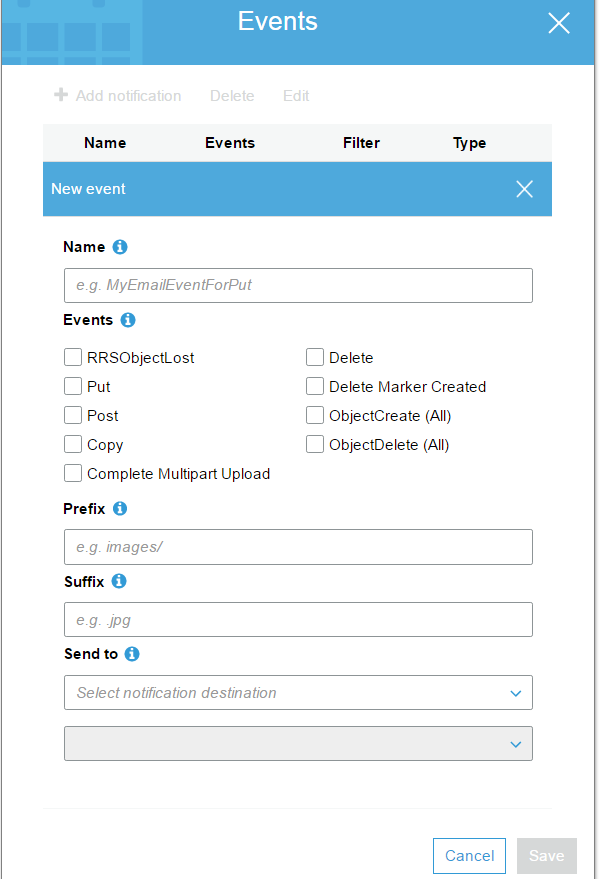
S3 – Cross Region Replication
- Versioning must be enabled on both the source and destination
- Regions must be unique
- Delete markers are replicated
When uploading a large number of objects, customers sometimes use sequential numbers or date and time values as part of their key names. For example, you might choose key names that use some combination of the date and time, as shown in the following example, where the prefix includes a timestamp:
if you expect a rapid increase in the request rate for a bucket to more than 300 PUT/LIST/DELETE requests per second or more than 800 GET requests per second, we recommend that you open a case with AWS
VPC Endpoint for Amazon S3
aws RDS – Read Replica
Amazon RDS – Read Replicas provide enhanced performance and durability for Databases ( DB) instances.
Read Replicas are available in Amazon RDS for
-MySQL
-PostgresSQL
-Amazon Aurora
-MariaDB
When you create a Read Replica, you specify an existing DB Instance as the source. Amazon RDS takes snapshot of the source instance and create a read-only instance from the snapshot
The read-replica operate as a DB instance that allows only read-only connections; applications can connect to a read-replica just as they would to any DB instance. Amazon RDS replicates all databases in the source DB instance.
Amazon RDS allows you to use read replicas with Multi-AZ deployments
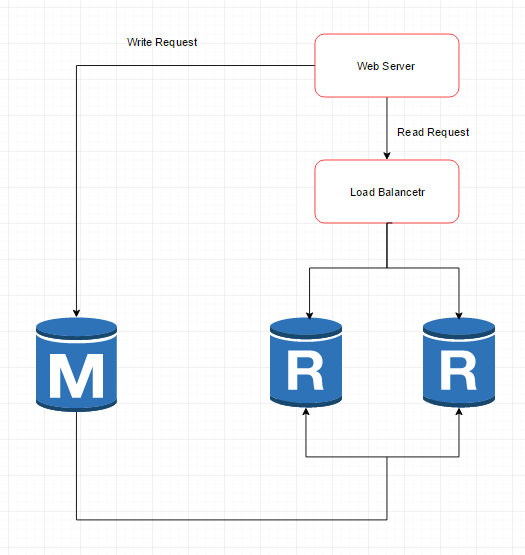
Below is common architecture of RDS Read Replica
- Web application
- Load Balancer
- RDS – Two read replica of master RDS
** Benefits
- Enhanced Performance
You can reduce the load on your source DB instance by routing read queries from your applications to the read replica. Read replicas allow you to elastically scale out beyond the capacity constrains of a single DB instance for read-heavy database workloads
- Increased Availability
- Designed for Security
When you create a read replica for Amazon RDS for MySQL and PostgreSQL, Amazon RDS setup a secure communications channel using public key encryption between the source DB instance and the read Replica
-Amazon RDS allows you to use read replicas with Multi-AZ deployments
-Amazon RDS read replica are asynchronous in their replications
-A read replica of the database cannot be created until automated backups are enabled
– Read replicas can be created from a read replica of another read replica
aws – VPC
Amazon VPC
You may connect your VPC to:
- The Internet (via an Internet gateway)
- Your corporate data center using a Hardware VPN connection (via the virtual private gateway)
- Both the Internet and your corporate data center (utilizing both an Internet gateway and a virtual private gateway)
- Other AWS services (via Internet gateway, NAT, virtual private pateway, or VPC endpoints)
- Other VPCs (via VPC peering connections)
- To change the size of a VPC you must terminate your existing VPC and create a new one
- Currently, Amazon VPC supports VPCs between /28 (in CIDR notation) and /16 in size. The IP address range of your VPC should not overlap with the IP address ranges of your existing network
- The minimum size of a subnet is a /28 (or 14 IP addresses.) Subnets cannot be larger than the VPC in which they are created
- An IP address assigned to a running instance can only be used again by another instance once that original running instance is in a “terminated” state
The first four IP addresses and the last IP address in each subnet CIDR block are not available for you to use, and cannot be assigned to an instance. For example, in a subnet with CIDR block 10.0.0.0/24, the following five IP addresses are reserved:
10.0.0.0: Network address.10.0.0.1: Reserved by AWS for the VPC router.10.0.0.2: Reserved by AWS for mapping to the Amazon-provided DNS.10.0.0.3: Reserved by AWS for future use.10.0.0.255: Network broadcast address. We do not support broadcast in a VPC, therefore we reserve this address.
Security groups in a VPC specify which traffic is allowed to or from an Amazon EC2 instance.
Network ACLs operate at the subnet level and evaluate traffic entering and exiting a subnet. Network ACLs can be used to set both Allow and Deny rules. Network ACLs do not filter traffic between instances in the same subnet. In addition, network ACLs perform stateless filtering while security groups perform stateful filtering
Rules are evaluated by rule number, from lowest to highest, and executed immediately when a matching allow/deny rule is found
Virtual Private Gateway – A virtual private Gateway enables private connectivity between the Amazon VPC an other network. Network traffic within each virtual private gateway is isolated from network traffic within all other virtual private gateways . You can establish VPN connections to the virtual private gateway from gateway devices at your premises . Each connection is secured by a pre-shared key in conjunction with the IP of address of the customer gateway devices.
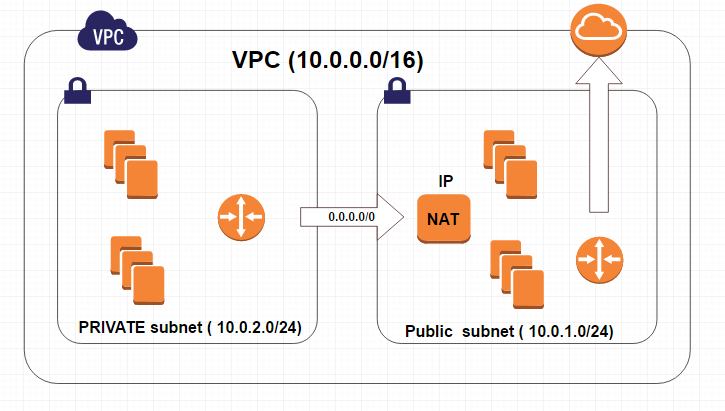
Internet Gateway – an Internet Gateway may be attached to an Amazon VPC to enable direct connectivity to Amazon S3, other AWS services, and the Internet . Each instance desiring this access must either have an Elastic IP associated with it or route traffic through a NAT instance.
NAT Access to Internet
VPC – peering
Invalid VPC Peering Connection Configuration
- VPC peering does not allow edge to edge routing
Ex:
-Edge to Edge Routing through VPN connection or an AWS Direct Connect connection
-Edge to Edge Routing through an Internet Gateway
- VPC peering does not allow transitive peering
- VPC peering does not allow CIDR block overlapping
– Stateful filtering tracks the origin of a request and can automatically allow the reply to the request to be returned to the originating computer.
For example, a stateful filter that allows inbound traffic to TCP port 80 on a webserver will allow the return traffic, usually on a high numbered
port (e.g., destination TCP port 63, 912) to pass through the stateful filter between the client and the webserver. The filtering device maintains
a state table that tracks the origin and destination port numbers and IP addresses. Only one rule is required on the filtering device: Allow traffic
inbound to the web server on TCP port 80.
– Stateless filtering, on the other hand, only examines the source or destination IP address and the destination port, ignoring whether the traffic
is a new request or a reply to a request. In the above example, two rules would need to be implemented on the filtering device:
one rule to allow traffic inbound to the web server on TCP port 80, and another rule to allow outbound traffic from the webserver
(TCP port range 49, 152 through 65, 535).
VPC Flow Logs
VPC Flow Logs is a feature that enables you to capture information about the IP traffic going to and from network interfaces in your VPC. Flow log data is stored using Amazon CloudWatch Logs. After you’ve created a flow log, you can view and retrieve its data in Amazon CloudWatch Logs
 Infra Cloud Solutions