Amazon RDS – Read Replicas provide enhanced performance and durability for Databases ( DB) instances.
Read Replicas are available in Amazon RDS for
-MySQL
-PostgresSQL
-Amazon Aurora
-MariaDB
When you create a Read Replica, you specify an existing DB Instance as the source. Amazon RDS takes snapshot of the source instance and create a read-only instance from the snapshot
The read-replica operate as a DB instance that allows only read-only connections; applications can connect to a read-replica just as they would to any DB instance. Amazon RDS replicates all databases in the source DB instance.
Amazon RDS allows you to use read replicas with Multi-AZ deployments
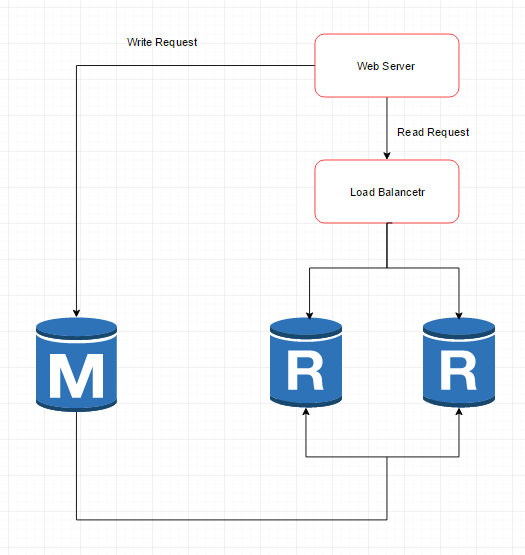
Below is common architecture of RDS Read Replica
- Web application
- Load Balancer
- RDS – Two read replica of master RDS
** Benefits
- Enhanced Performance
You can reduce the load on your source DB instance by routing read queries from your applications to the read replica. Read replicas allow you to elastically scale out beyond the capacity constrains of a single DB instance for read-heavy database workloads
- Increased Availability
- Designed for Security
When you create a read replica for Amazon RDS for MySQL and PostgreSQL, Amazon RDS setup a secure communications channel using public key encryption between the source DB instance and the read Replica
-Amazon RDS allows you to use read replicas with Multi-AZ deployments
-Amazon RDS read replica are asynchronous in their replications
-A read replica of the database cannot be created until automated backups are enabled
– Read replicas can be created from a read replica of another read replica
 Infra Cloud Solutions