Amazon VPC
You may connect your VPC to:
- The Internet (via an Internet gateway)
- Your corporate data center using a Hardware VPN connection (via the virtual private gateway)
- Both the Internet and your corporate data center (utilizing both an Internet gateway and a virtual private gateway)
- Other AWS services (via Internet gateway, NAT, virtual private pateway, or VPC endpoints)
- Other VPCs (via VPC peering connections)
- To change the size of a VPC you must terminate your existing VPC and create a new one
- Currently, Amazon VPC supports VPCs between /28 (in CIDR notation) and /16 in size. The IP address range of your VPC should not overlap with the IP address ranges of your existing network
- The minimum size of a subnet is a /28 (or 14 IP addresses.) Subnets cannot be larger than the VPC in which they are created
- An IP address assigned to a running instance can only be used again by another instance once that original running instance is in a “terminated” state
The first four IP addresses and the last IP address in each subnet CIDR block are not available for you to use, and cannot be assigned to an instance. For example, in a subnet with CIDR block 10.0.0.0/24, the following five IP addresses are reserved:
10.0.0.0: Network address.10.0.0.1: Reserved by AWS for the VPC router.10.0.0.2: Reserved by AWS for mapping to the Amazon-provided DNS.10.0.0.3: Reserved by AWS for future use.10.0.0.255: Network broadcast address. We do not support broadcast in a VPC, therefore we reserve this address.
Security groups in a VPC specify which traffic is allowed to or from an Amazon EC2 instance.
Network ACLs operate at the subnet level and evaluate traffic entering and exiting a subnet. Network ACLs can be used to set both Allow and Deny rules. Network ACLs do not filter traffic between instances in the same subnet. In addition, network ACLs perform stateless filtering while security groups perform stateful filtering
Rules are evaluated by rule number, from lowest to highest, and executed immediately when a matching allow/deny rule is found
Virtual Private Gateway – A virtual private Gateway enables private connectivity between the Amazon VPC an other network. Network traffic within each virtual private gateway is isolated from network traffic within all other virtual private gateways . You can establish VPN connections to the virtual private gateway from gateway devices at your premises . Each connection is secured by a pre-shared key in conjunction with the IP of address of the customer gateway devices.
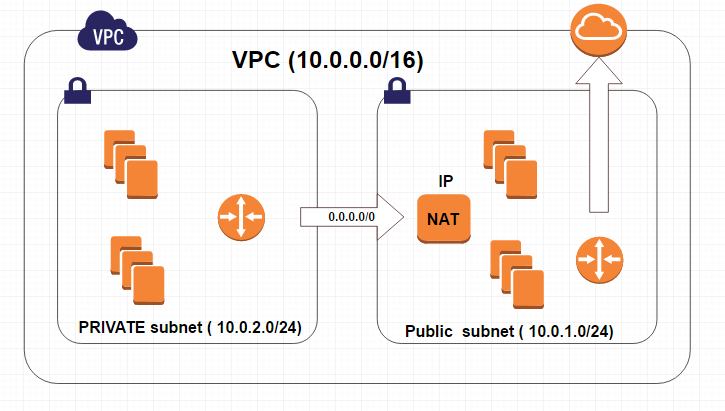
Internet Gateway – an Internet Gateway may be attached to an Amazon VPC to enable direct connectivity to Amazon S3, other AWS services, and the Internet . Each instance desiring this access must either have an Elastic IP associated with it or route traffic through a NAT instance.
NAT Access to Internet
VPC – peering
Invalid VPC Peering Connection Configuration
- VPC peering does not allow edge to edge routing
Ex:
-Edge to Edge Routing through VPN connection or an AWS Direct Connect connection
-Edge to Edge Routing through an Internet Gateway
- VPC peering does not allow transitive peering
- VPC peering does not allow CIDR block overlapping
– Stateful filtering tracks the origin of a request and can automatically allow the reply to the request to be returned to the originating computer.
For example, a stateful filter that allows inbound traffic to TCP port 80 on a webserver will allow the return traffic, usually on a high numbered
port (e.g., destination TCP port 63, 912) to pass through the stateful filter between the client and the webserver. The filtering device maintains
a state table that tracks the origin and destination port numbers and IP addresses. Only one rule is required on the filtering device: Allow traffic
inbound to the web server on TCP port 80.
– Stateless filtering, on the other hand, only examines the source or destination IP address and the destination port, ignoring whether the traffic
is a new request or a reply to a request. In the above example, two rules would need to be implemented on the filtering device:
one rule to allow traffic inbound to the web server on TCP port 80, and another rule to allow outbound traffic from the webserver
(TCP port range 49, 152 through 65, 535).
VPC Flow Logs
VPC Flow Logs is a feature that enables you to capture information about the IP traffic going to and from network interfaces in your VPC. Flow log data is stored using Amazon CloudWatch Logs. After you’ve created a flow log, you can view and retrieve its data in Amazon CloudWatch Logs
 Infra Cloud Solutions