Here’s a reference architecture for a banking chatbot on Azure OpenAI that’s designed for security, grounding, auditability, and human handoff.
Architecture
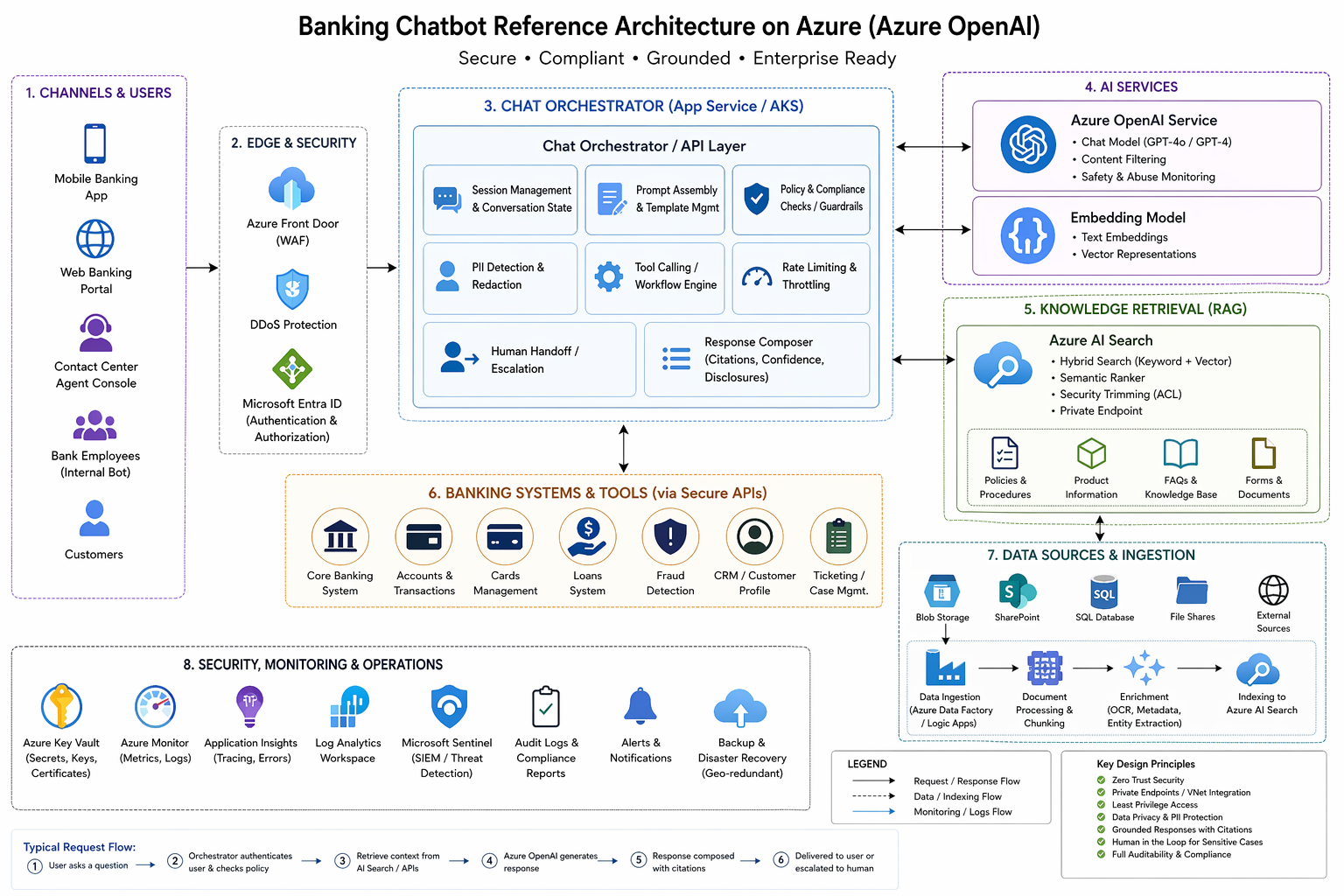
Customers / Bank staff ↓Web / Mobile / Contact-center UI ↓API Gateway / WAF ↓Chat Orchestrator (App Service / AKS) ├─ Microsoft Entra ID auth ├─ session state + rate limiting ├─ prompt assembly + policy checks ├─ tool calling / workflow engine ├─ PII masking / redaction └─ escalation to human agent ↓+---------------------------+---------------------------+| | |v v vAzure OpenAI Azure AI Search Core banking tools/APIs(chat + embeddings) (hybrid RAG index) (CRM, accounts, cards, loans, fraud, ticketing)| || v| Indexed bank knowledge| ├─ policies / FAQs| ├─ product docs| ├─ procedures / SOPs| └─ secure document ACLs|vResponse composer ├─ citations ├─ confidence scoring ├─ compliance banners └─ allowed action filtering ↓Customer response / human handoffSupporting services:- Azure Key Vault- Azure Monitor / App Insights / Log Analytics- Microsoft Sentinel- Private endpoints / VNet integration- Blob / SharePoint / SQL ingestion pipeline
This structure follows Microsoft’s current baseline enterprise chat architecture for Azure, where the application layer sits in front of the model and retrieval services, uses private networking, and keeps orchestration separate from the model itself. Azure also recommends Azure AI Search as the retrieval layer for RAG, with support for hybrid retrieval, document-level security trimming, and private endpoints. (Microsoft Learn)
What each layer does
1. Channels and identity
Customers access the bot through mobile banking, web banking, or a contact-center console. Use Microsoft Entra ID for workforce users and your bank’s customer identity stack for retail users, then pass identity and entitlement context to the orchestrator. Azure AI Search recommends Entra-based auth and role-based access because it gives centralized identity, conditional access, and stronger audit trails. (Microsoft Learn)
2. Chat orchestrator
This is the most important layer. It handles conversation memory, prompt templates, rate limiting, policy checks, tool access, and handoff to a human agent. Microsoft’s baseline Azure chat reference architecture puts this orchestration layer between the UI and Azure OpenAI rather than letting clients call the model directly. (Microsoft Learn)
3. Azure OpenAI
Use one deployment for the chat model and another for embeddings. The chat model generates answers; the embedding model helps retrieve relevant knowledge chunks. Azure documents content filtering and abuse monitoring as built-in safety controls, which is especially important for regulated customer-facing use. (Microsoft Learn)
4. Azure AI Search for grounding
For banking, do not rely on the model’s memory for policies, fees, disclosures, or procedures. Put approved content into Azure AI Search and use hybrid retrieval so the chatbot answers with grounded content and citations. Microsoft’s current guidance explicitly recommends Azure AI Search for RAG and notes support for security trimming and private network isolation. (Microsoft Learn)
5. Banking systems and tools
The chatbot should not directly expose raw core banking systems to the model. Instead, the orchestrator should call tightly scoped internal APIs for approved actions like “show recent transactions,” “freeze card,” or “open a support case.” That way the model suggests the action, but the backend enforces the rules.
Banking-specific design principles
Grounded answers only for policy and product questions
Use RAG for fees, terms, product comparisons, and internal procedures. This reduces hallucinations and supports citations. Microsoft’s RAG guidance for Azure AI Search emphasizes grounding, citations, and security-aware retrieval. (Microsoft Learn)
Document-level access control
If the chatbot is used by employees, access trimming matters a lot. A branch employee should not retrieve internal audit documents just because they ask. Azure AI Search supports document-level access control and security trimming patterns tied to identity. (Microsoft Learn)
Private networking by default
For a bank, expose as little as possible publicly. Microsoft’s baseline Azure chat architecture uses private endpoints and VNet integration, and Azure OpenAI On Your Data guidance also calls out private networking and restricted access paths. (Microsoft Learn)
Human handoff for sensitive cases
For fraud claims, hardship, complaints, suspicious activity, or low-confidence responses, the bot should escalate to a human banker or contact-center agent instead of improvising.
Audit everything
Send logs, prompts, tool calls, retrieval events, and security events to Azure Monitor and Microsoft Sentinel. Sentinel is Microsoft’s cloud-native SIEM for detection, investigation, and response, which fits banking operational monitoring well. (Microsoft Learn)
Recommended banking use cases
Good first-wave use cases:
- product FAQs
- branch and ATM help
- card controls like freeze/unfreeze
- loan application status
- internal employee knowledge assistant
- secure document Q&A for policies and procedures
Use more caution with:
- personalized financial advice
- transaction disputes
- fraud investigations
- credit decisions
- anything that creates legal or regulatory commitments
Suggested deployment pattern
For a bank, I’d recommend this split:
Customer bot
- retail/mobile/web channels
- heavily restricted tools
- strict content policy
- human handoff early
Employee copilot
- internal knowledge access
- stronger retrieval permissions
- workflow tools for CRM/ticketing
- document-level access trimming
This split reduces risk because customer-facing and employee-facing requirements are usually very different.
Minimal Azure stack
- Frontend: Web app, mobile app, or contact-center console
- Orchestrator: Azure App Service or AKS
- LLM: Azure OpenAI
- Retrieval: Azure AI Search
- Identity: Microsoft Entra ID
- Secrets: Azure Key Vault
- Monitoring: Azure Monitor + Application Insights + Log Analytics
- Security ops: Microsoft Sentinel
- Documents: Blob / SharePoint / SQL ingestion pipeline
This aligns closely with Microsoft’s baseline Foundry chat architecture and Azure AI Search RAG guidance. (Microsoft Learn)
Practical request flow
1. User asks: "What is my mortgage payoff amount?"2. Orchestrator authenticates user and checks entitlements.3. If answer needs bank data, orchestrator calls approved internal API.4. If answer needs policy text, orchestrator queries Azure AI Search.5. Azure OpenAI generates a grounded response using retrieved data.6. Response includes citation or disclosure.7. If confidence is low or request is high-risk, escalate to human agent.
What I would avoid
- letting the frontend call Azure OpenAI directly
- storing sensitive long-term memory in prompts
- giving the model direct unrestricted access to core banking systems
- answering regulated policy questions without retrieval/citations
- using only vector search when hybrid search is available
- treating safety filters as the only compliance control
Best one-line summary
For a banking chatbot on Azure, the safest reference architecture is:
customer/app channel → secure orchestrator → Azure OpenAI + Azure AI Search → tightly scoped banking APIs, all behind private networking with identity-aware retrieval, full logging, and human escalation. (Microsoft Learn)
 Infra Cloud Solutions