AWS – IAM

AWS IAM enables you to implement security best practices, such as least privilege, by granting unique credentials to every user within your AWS account and only granting permission to access the AWS services and resources required for the users  to perform their jobs.

AWS IAM is secure by default; new users have no access to AWS until permission are explicitly granted .

IAM Role

An IAM role use temporary security credentials to allow you to delegate access users or services that normally don’t have access to your AWS resources

  • You can not change IAM role on a running EC2 instance
  • you can only associated a IAM role while launching EC2 instance

Permissions

  • managed policies can only be attached to IAM users, groups, or roles. You can not use them as resource-based policies

Temporary security credentials

  • temporary security credentials are sometimes simple referred to as tokens

Identity Federation

  • AWS supports the Security Assertion Markup Language (SAML) 2.0.
  • Federated users (non – AWS , external identities) are users you manage outside of AWS in your corporate directory, but to whom you grant access to your AWS account using temporary security credentials. They differ from IAM users, which are created and maintained in your AWS account.

– web identity federation

Multi-Factor Authentication (MFA)

Multi Factor Authentication – used as a second factor authentication to help secure Root and IAM user accounts

AWS MFA supports the use of both hardware tokens and virtual MFA devices .

Time -Based One_time Password – TOTP

Notes:

– The credentials report list all users in your account and the status of their various credentials, including passwords, access key, and MFA devices

– by default, when you createating a new user via the IAM console :

  • the user does not get notified of the creation via email
  • the user will be provisioned with Access Key
  • the user does not have access to any resources until they are specifically granted

Determining Whether a Request is Allowed or Denied

When a request is made, the AWS service decides whether a given request should be allowed or denied. The evaluation logic follows these rules:

  • By default, all requests are denied. (In general, requests made using the account credentials for resources in the account are always allowed.)
  • An explicit allow overrides this default.
  • An explicit deny overrides any allows.

reference

http://docs.aws.amazon.com/IAM/latest/UserGuide/reference_policies_evaluation-logic.html

AWS – RDS

Amazon Relational Database Service (Amazon RDS) is a managed services that makes it easy to setup, operate, and scale a relational database in the cloud.

RDS events are published via AWS SNS and sent to you as an email or text message.

Amazon RDS gives you access to the capabilities of a familiar MySQL, MariaDB, Oracle, SQL Server, or PostgreSQL database

Amazon RDS, wit is multiple AZ feature, is designed to provide synchronous replica to keep data on standby nod e uo-to-date with primary

-Enhanced Monitoring captures your RDS instance system level metrics such as CPU, memory, file system and disk I/O among others .

You can think of a DB Instance as a database environment in the cloud with the compute and storage resources you specify. You can create and delete DB Instances, define/refine infrastructure attributes of your DB Instance(s), and control access and security via the AWS Management Console , Amazon RDS APIs, and Command Line Tools.

You can run one or more DB Instances , and each DB Instance can support one or more databases or databases schema, depending on engine type.

– Creating a DB snapshot on a single – AZ DB instance result in a brief I?O suspension that typically lasting no more than few minutes. Multi AZ DB instances are not affected by this I/O suspension since backup is taken on the standby.


– To launch an instance from a snapshot in a different region, you have to first copy the snapshot from the region where it was created
and stored, into the target region.

RDS Dashboard –> Instance  —> Select the RDS Instances —> Instance Actions —-> Take a Snapshot

After you take a snapshot

In the RDS console, from the origin region, choose “Snapshots,” then select the snapshot you want to copy, then click “Copy Snapshot.”
You will be given a choice of the destination region for the snapshot copy.

After the copy is complete, you’ll see the snapshot under “Snapshots” in the target region. From there, you should be able to use that snapshot

to create a new instance.


Another option now available is cross-region replication, which allows a live replica to be created in one region, from a master in a different region.

This is relevant, because it could be used for the same purpose of moving a master server to a different region. In this scenario, the master could be
migrated from one region to another with minimum downtime by first setting up a cross-region replica in the desired target region, and once the target
RDS instance had been created and synchronized to the master, you would disconnect the application from the old master, and then convert the new replica
in the new region into a standalone master server, by choosing “Promote Read Replica” from “Instance Actions” in the console, which would sever the
connection between the replica and its old master, and allow direct write access to it, since it would now be the new master.

Reserved Instances give you the option to reserve capacity within a datacenter and in turn receive a significant discount on the hourly charge for instances that are covered by the reservation. There are three RI payment options

— No UpfrontPartial Upfront, All Upfront

which enable you to balance the amount you pay upfront with your effective hourly price.

Backup

– Amazon RDS uses a default period retention period one day. You can modify the backup retention period; valid values are 0 ( for no backup retention) to a maximum 35 days.

  • The automated backup feature of Amazon RDS enables point-in-time recovery of your DB instance

-AWS offers automated backups of RDS

-Automated backups of RDS databases are deleted when an RDS instance is terminated

ansible – add-hoc commands

#ansible-playbook -l host_subset playbook.yml


Make changes to just one server

ovi@work:~$ ansible open  -a “free -m” -k
SSH password:
n1 | success | rc=0 >>
total       used       free     shared    buffers     cached
Mem:          7942       6484       1457         10        235       4377
-/+ buffers/cache:       1871       6070
Swap:         4061          0       4061

work | success | rc=0 >>
total       used       free     shared    buffers     cached
Mem:         16004      15845        159          0         33      14142
-/+ buffers/cache:       1668      14335
Swap:         8147        691       7456

use limit to make changes to just one server

ovi@work:~$ ansible open  -a “free -m” -k –limit n1
SSH password:
n1 | success | rc=0 >>
total       used       free     shared    buffers     cached
Mem:          7942       6484       1457         10        235       4377
-/+ buffers/cache:       1871       6070
Swap:         4061          0       4061

create a directory

ovi@work:~$ ansible open -m file -a “dest=/tmp/test mode=644 state=directory” -k
SSH password:
work | success >> {
“changed”: true,
“gid”: 1001,
“group”: “asix”,
“mode”: “0644”,
“owner”: “asix”,
“path”: “/tmp/test”,
“size”: 4096,
“state”: “directory”,
“uid”: 1001
}

n1 | success >> {
“changed”: true,
“gid”: 1001,
“group”: “asix”,
“mode”: “0644”,
“owner”: “asix”,
“path”: “/tmp/test”,
“size”: 4096,
“state”: “directory”,
“uid”: 1001
}


ovi@work:~$ ansible open -m stat -a “path=/etc/hosts” -k
SSH password:
n1 | success >> {
“changed”: false,
“stat”: {
“atime”: 1470711574.6343062,
“ctime”: 1469933973.2155738,
“dev”: 2049,
“exists”: true,
“gid”: 0,
“inode”: 62128485,
“isblk”: false,
“ischr”: false,
“isdir”: false,
“isfifo”: false,
“isgid”: false,
“islnk”: false,
“isreg”: true,
“issock”: false,
“isuid”: false,
“md5”: “8a22e2c2a4eb70dabb08c3527c5f8dfb”,
“mode”: “0644”,
“mtime”: 1469933973.2155738,
“nlink”: 1,
“pw_name”: “root”,
“rgrp”: true,
“roth”: true,
“rusr”: true,
“size”: 245,
“uid”: 0,
“wgrp”: false,
“woth”: false,
“wusr”: true,
“xgrp”: false,
“xoth”: false,
“xusr”: false
}
}

work | success >> {
“changed”: false,
“stat”: {
“atime”: 1470730625.26867,
“ctime”: 1467791669.1463304,
“dev”: 2049,
“exists”: true,
“gid”: 0,
“inode”: 45875357,
“isblk”: false,
“ischr”: false,
“isdir”: false,
“isfifo”: false,
“isgid”: false,
“islnk”: false,
“isreg”: true,
“issock”: false,
“isuid”: false,
“md5”: “f4abed992d2152fbb99e6c5a3bc4343d”,
“mode”: “0644”,
“mtime”: 1467791669.1463304,
“nlink”: 1,
“pw_name”: “root”,
“rgrp”: true,
“roth”: true,
“rusr”: true,
“size”: 238,
“uid”: 0,
“wgrp”: false,
“woth”: false,
“wusr”: true,
“xgrp”: false,
“xoth”: false,
“xusr”: false
}
}

[root@ip-172-..-126 ~]# ansible localhost -m setup | grep distribution

“ansible_distribution”: “Amazon”,
“ansible_distribution_major_version”: “NA”,
“ansible_distribution_release”: “NA”,
“ansible_distribution_version”: “2017.03”,

[root@ip-172-..-126 ~]# ansible localhost -m setup -a ‘filter=ansible_dist*’

localhost | SUCCESS => {
“ansible_facts”: {
“ansible_distribution”: “Amazon”,
“ansible_distribution_major_version”: “NA”,
“ansible_distribution_release”: “NA”,
“ansible_distribution_version”: “2017.03”
},
“changed”: false
}
OpenStack – Neutron debug

root@osc:/# nova list –all_tenants | grep ov1
| 3b49799f-4149-4f17-8f04-55e0a683066a | ov1        | ACTIVE | –          | Running     | net_ext2=192.168.122.6  |

root@n1:/var/lib/nova/instances/3b49799f-4149-4f17-8f04-55e0a683066a# grep -i tap libvirt.xml
<target dev=”tapdc783dde-d2“/>


root@n1:/var/lib/nova/instances/3b49799f-4149-4f17-8f04-55e0a683066a# iptables -S | grep dc783dde
-N neutron-openvswi-idc783dde-d
-N neutron-openvswi-odc783dde-d
-N neutron-openvswi-sdc783dde-d
-A neutron-openvswi-FORWARD -m physdev –physdev-out tapdc783dde-d2 –physdev-is-bridged -j neutron-openvswi-sg-chain
-A neutron-openvswi-FORWARD -m physdev –physdev-in tapdc783dde-d2 –physdev-is-bridged -j neutron-openvswi-sg-chain
-A neutron-openvswi-INPUT -m physdev –physdev-in tapdc783dde-d2 –physdev-is-bridged -j neutron-openvswi-odc783dde-d
-A neutron-openvswi-idc783dde-d -m state –state RELATED,ESTABLISHED -j RETURN
-A neutron-openvswi-idc783dde-d -s 192.168.122.3/32 -p udp -m udp –sport 67 –dport 68 -j RETURN
-A neutron-openvswi-idc783dde-d -p tcp -m tcp –dport 22 -j RETURN
-A neutron-openvswi-idc783dde-d -p icmp -j RETURN
-A neutron-openvswi-idc783dde-d -m set –match-set NETIPv44ccfe044-b6e2-423 src -j RETURN
-A neutron-openvswi-idc783dde-d -m state –state INVALID -j DROP
-A neutron-openvswi-idc783dde-d -j neutron-openvswi-sg-fallback
A neutron-openvswi-odc783dde-d -p udp -m udp –sport 68 –dport 67 -j RETURN
-A neutron-openvswi-odc783dde-d -j neutron-openvswi-sdc783dde-d
-A neutron-openvswi-odc783dde-d -p udp -m udp –sport 67 –dport 68 -j DROP
-A neutron-openvswi-odc783dde-d -m state –state RELATED,ESTABLISHED -j RETURN
-A neutron-openvswi-odc783dde-d -j RETURN
-A neutron-openvswi-odc783dde-d -m state –state INVALID -j DROP
-A neutron-openvswi-odc783dde-d -j neutron-openvswi-sg-fallback
-A neutron-openvswi-sdc783dde-d -s 192.168.122.6/32 -m mac –mac-source FA:16:3E:4F:FD:53 -j RETURN
-A neutron-openvswi-sdc783dde-d -j DROP
-A neutron-openvswi-sg-chain -m physdev –physdev-out tapdc783dde-d2 –physdev-is-bridged -j neutron-openvswi-idc783dde-d
-A neutron-openvswi-sg-chain -m physdev –physdev-in tapdc783dde-d2 –physdev-is-bridged -j neutron-openvswi-odc783dde-d


root@n1:~# brctl show
bridge name                        bridge id        STP          enabled    interfaces
qbr68056772-f9        8000.fa13574c4ed1    no        qvb68056772-f9
tap68056772-f9
qbr73435e86-ea        8000.ce293c1486a0    no        qvb73435e86-ea
tap73435e86-ea
qbr9774fd60-c9        8000.468449c27608    no        qvb9774fd60-c9
tap9774fd60-c9
qbrd5b4ec48-7a        8000.76161ed62b88    no        qvbd5b4ec48-7a
tapd5b4ec48-7a
qbrdc783dde-d2        8000.3ef673f5c71d    no        qvbdc783dde-d2
tapdc783dde-d2
virbr0        8000.000000000000    yes


root@n1:~# ovs-vsctl show
99f3e195-b0e4-4d2b-af97-0ad02c8e0125
Bridge br-int
fail_mode: secure
Port br-int
Interface br-int
type: internal
Port patch-tun
Interface patch-tun
type: patch
options: {peer=patch-int}
Port “qvodc783dde-d2”
tag: 1
Interface “qvodc783dde-d2”
Port “qvo73435e86-ea”
tag: 1
Interface “qvo73435e86-ea”
Port “qvo9774fd60-c9”
tag: 4
Interface “qvo9774fd60-c9”
Port “qvo68056772-f9”
tag: 2
Interface “qvo68056772-f9”
Port “qvod5b4ec48-7a”
tag: 3
Interface “qvod5b4ec48-7a”
Bridge br-tun
fail_mode: secure
Port br-tun
Interface br-tun
type: internal
Port “gre-c0a8640a”
Interface “gre-c0a8640a”
type: gre
options: {df_default=”true”, in_key=flow, local_ip=”192.168.100.12″, out_key=flow, remote_ip=”192.168.100.10″}
Port patch-int
Interface patch-int
type: patch
options: {peer=patch-tun}
ovs_version: “2.0.2”


root@work:~# ip netns list
qdhcp-79521d7b-5be6-46ec-ad26-2cef476e238c
qdhcp-3d08e795-22cf-4210-841e-749670aae23a
qdhcp-5a443267-f277-4d3d-b19b-9d5540c38cd4
qdhcp-8fba63e3-7650-4b23-9495-1ba81ee1b310
qdhcp-473bfc4b-866f-4fbb-bd11-a975d300f710 ——–>>>>  Network ID ( EXT 2 )
qdhcp-947108a9-b157-44ac-bfa0-5652fb6e3480
qrouter-2078f2ea-3b8a-4811-8173-b38bb84c9b6b
qrouter-b69e49fa-a09a-4d4a-927e-f764f25a2778

root@work:~# ip netns exec qdhcp-473bfc4b-866f-4fbb-bd11-a975d300f710 ip addr
1: lo: <LOOPBACK,UP,LOWER_UP> mtu 65536 qdisc noqueue state UNKNOWN group default
link/loopback 00:00:00:00:00:00 brd 00:00:00:00:00:00
inet 127.0.0.1/8 scope host lo
valid_lft forever preferred_lft forever
inet6 ::1/128 scope host
valid_lft forever preferred_lft forever
20: tap480bbf91-8b: <BROADCAST,UP,LOWER_UP> mtu 1500 qdisc noqueue state UNKNOWN group default
link/ether fa:16:3e:c2:d4:87 brd ff:ff:ff:ff:ff:ff
inet 192.168.122.3/24 brd 192.168.122.255 scope global tap480bbf91-8b
valid_lft forever preferred_lft forever
inet6 fe80::f816:3eff:fec2:d487/64 scope link
valid_lft forever preferred_lft forever


root@work:~# ps -auxww | grep 473bfc4b-866f-4fbb-bd11-a975d300f710
nobody    3979  0.0  0.0  28208  1352 ?        S    aug05   0:00 dnsmasq –no-hosts –no-resolv –strict-order –bind-interfaces –interface=tap480bbf91-8b –except-interface=lo –pid-file=/var/lib/neutron/dhcp/473bfc4b-866f-4fbb-bd11-a975d300f710/pid –dhcp-hostsfile=/var/lib/neutron/dhcp/473bfc4b-866f-4fbb-bd11-a975d300f710/host –addn-hosts=/var/lib/neutron/dhcp/473bfc4b-866f-4fbb-bd11-a975d300f710/addn_hosts –dhcp-optsfile=/var/lib/neutron/dhcp/473bfc4b-866f-4fbb-bd11-a975d300f710/opts –dhcp-leasefile=/var/lib/neutron/dhcp/473bfc4b-866f-4fbb-bd11-a975d300f710/leases –dhcp-range=set:tag0,192.168.122.0,static,86400s –dhcp-lease-max=256 –conf-file= –domain=openstacklocal
root     17864  0.0  0.0  17552  2536 pts/7    S+   19:40   0:00 grep –color=auto 473bfc4b-866f-4fbb-bd11-a975d300f710


root@work:~# ip netns exec qdhcp-473bfc4b-866f-4fbb-bd11-a975d300f710 tcpdump port 67 or port 68 -lne
tcpdump: verbose output suppressed, use -v or -vv for full protocol decode
listening on tap480bbf91-8b, link-type EN10MB (Ethernet), capture size 65535 bytes


root@work:~# ip netns exec qdhcp-473bfc4b-866f-4fbb-bd11-a975d300f710 ip li
1: lo: <LOOPBACK,UP,LOWER_UP> mtu 65536 qdisc noqueue state UNKNOWN mode DEFAULT group default
link/loopback 00:00:00:00:00:00 brd 00:00:00:00:00:00
20: tap480bbf91-8b: <BROADCAST,UP,LOWER_UP> mtu 1500 qdisc noqueue state UNKNOWN mode DEFAULT group default
link/ether fa:16:3e:c2:d4:87 brd ff:ff:ff:ff:ff:ff

root@work:~# ovs-vsctl show | grep -A1 tap480bbf91-8b
        Port “tap480bbf91-8b”
tag: 1
Interface “tap480bbf91-8b”
type: internal


root@work:~# ip netns exec qrouter-b69e49fa-a09a-4d4a-927e-f764f25a2778 ip rule
0:    from all lookup local
32766:    from all lookup main
32767:    from all lookup default

root@work:~# ip netns exec qrouter-2078f2ea-3b8a-4811-8173-b38bb84c9b6b ip rule
0:    from all lookup local
32766:    from all lookup main
32767:    from all lookup default


root@osc:/etc/nova# neutron router-list

root@osc:/etc/nova# neutron l3-agent-list-hosting-router router_dev2
+————————————–+—————- – +—————-      +——-+
| id                                                                     | host  | admin_state_up | alive  |
+————————————–                  +——+—————-+——-+
| e6071dcc-4c12-45ba-a7b1-01e64af15c42 | work  | True                   |    🙂    |
+————————————–+     —–           ——+—————-+——-+


root@osc:/home/asix# nova list
+————————————–+——–+——–+————+————-+————————————-+
| ID | Name | Status | Task State | Power State | Networks |
+————————————–+——–+——–+————+————-+————————————-+
| 0bf8961d-6326-49b9-a501-16cb7bdcd48c | asix1 | ACTIVE | – | Running | lingesh-net=192.168.4.10 |
| b581acb0-337c-497e-ad35-09da84492277 | i1 | ACTIVE | – | Running | lingesh-net=192.168.4.9 |
| 718f28af-4126-4af3-8f69-4505874216b9 | ovi777 | ACTIVE | – | Running | test-metadata-in-dhcp=192.168.111.4 |
| e6c1bbdf-3bcd-42ba-a70d-d9bad0b7de14 | ovi778 | ACTIVE | – | Running | test-metadata-in-dhcp=192.168.111.5 |
+————————————–+——–+——–+————+————-+————————————-+
root@osc:/home/asix# nova show asix1
+————————————–+———————————————————-+
| Property | Value |
+————————————–+———————————————————-+
| OS-DCF:diskConfig | AUTO |
| OS-EXT-AZ:availability_zone | nova |
| OS-EXT-SRV-ATTR:host | n1 |
| OS-EXT-SRV-ATTR:hypervisor_hostname | n1 |
| OS-EXT-SRV-ATTR:instance_name | instance-00000064 |
| OS-EXT-STS:power_state | 1 |
| OS-EXT-STS:task_state | – |
| OS-EXT-STS:vm_state | active |
| OS-SRV-USG:launched_at | 2016-08-20T20:56:12.000000 |
| OS-SRV-USG:terminated_at | – |
| accessIPv4 | |
| accessIPv6 | |
| config_drive | |
| created | 2016-08-20T20:55:39Z |
| flavor | m1.small (2) |
| hostId | 410946e5d0a018e7b0327d3072ee33edc19b066d2024d804e3a62e07 |
| id | 0bf8961d-6326-49b9-a501-16cb7bdcd48c |
| image | CentOS (6d3b314b-de25-4f09-aefa-64cbb762937d) |
| key_name | k1 |
| lingesh-net network | 192.168.4.10 |
| metadata | {} |
| name | asix1 |
| os-extended-volumes:volumes_attached | [] |
| progress | 0 |
| security_groups | default |
| status | ACTIVE |
| tenant_id | 859ccf28d2824d4a844f819b4f33e257 |
| updated | 2016-08-20T20:56:12Z |
| user_id | 81bf40676b004e2cba0cd583ac9d4dc8 |
+————————————–+———————————————————-+


root@osc:/home/asix# nova-manage service list
Binary           Host                                 Zone             Status     State Updated_At
nova-cert        osc                                  internal         enabled    XXX   2016-08-21 17:18:19
nova-consoleauth osc                                  internal         enabled    🙂   2016-08-21 20:01:10
nova-scheduler   osc                                  internal         enabled    XXX   2016-08-21 17:18:14
nova-conductor   osc                                  internal         enabled    🙂   2016-08-21 20:01:10
nova-compute     n1                                   nova             enabled    🙂   2016-08-21 20:01:04

root@osc:/home/asix# service nova-scheduler status
nova-scheduler stop/waiting

root@osc:/home/asix# service nova-scheduler start
nova-scheduler start/running, process 4075

root@osc:/home/asix# service nova-cert status
nova-cert stop/waiting

root@osc:/home/asix# service nova-cert start
nova-cert start/running, process 4105

root@osc:/home/asix# service nova-cert status
nova-cert start/running, process 4105


aws – Placement Groups

Placement Groups

A placement groups is a logical grouping of instances within a single Availability Zone.

Placement Groups are recommended for applications that benefit from low network latency, high network throughput, or both

Placement Groups Limitations 

Placement Group have the flowing limitations:

  • A placement group can’t span multiple AZ’s
  • Not all instance types support placement groups
  • The name of specific placement group mus be unique within your AWS account
  • Not all the instances types that can be lunched into a placement group can take full advantage of the 10 Gbps network

You can delete placement group if you no longer need. Before you can delete you placement group, you must terminate all instances that you lunched into the placement group .

aws – Direct Connect

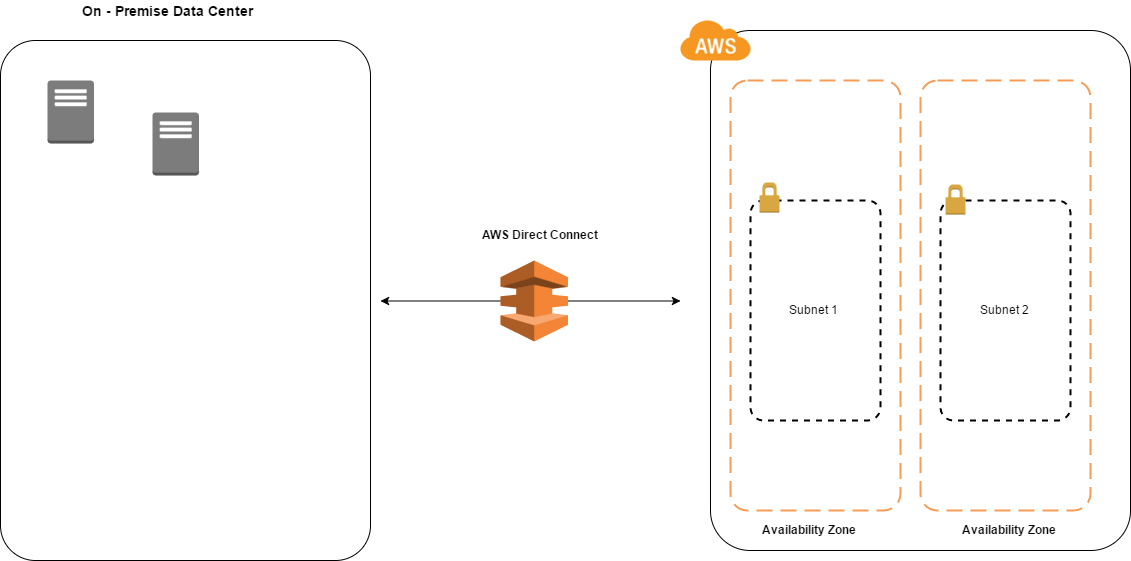
AWS Direct Connect is a network service that provides an alternatives to using  the Internet to utilize  AWS cloud services.With AWS Direct Connect, you can provision  a direct link between your internal network and an AWS region using a high-throughput, dedicated connections

  • reduce your network cost
  • improve your througput
  • provide more consistent network experience

AWS Direct connect speed

1Gbps and 10Gbps ports are available . Speeds of 50Mbs, 100Mbps, 200|Mbps, 300MBps, 400Mbps and 500Mbps can be ordered from any APN


OpenStack

root@osc:~# glance –version
0.14.0

root@osc:~# neutron –version
2.3.8

root@osc:~# nova –version
2.19.0


root@osc:~# nova service-list
+—-+——————+——+———-+———+——-+—————————-+—-+
| Id    | Binary               | Host | Zone     | Status | State | Updated_at | Disabled Reason |
+—-+——————+——+———-+———+——-+—————————-+—–+
| 1 | nova-cert                | osc | internal | enabled | up | 2016-07-28T12:48:15.000000 | – |
| 2 | nova-consoleauth | osc | internal | enabled | up | 2016-07-28T12:48:21.000000 | – |
| 3 | nova-scheduler  | osc | internal | enabled | up | 2016-07-28T12:48:15.000000 | – |
| 4 | nova-conductor | osc | internal | enabled | up | 2016-07-28T12:48:21.000000 | – |
| 5 | nova-compute    | n1   | nova      | enabled | up | 2016-07-28T12:47:25.000000 | – |
+—-+——————+——+———-+———+——-+—————————-+—-+


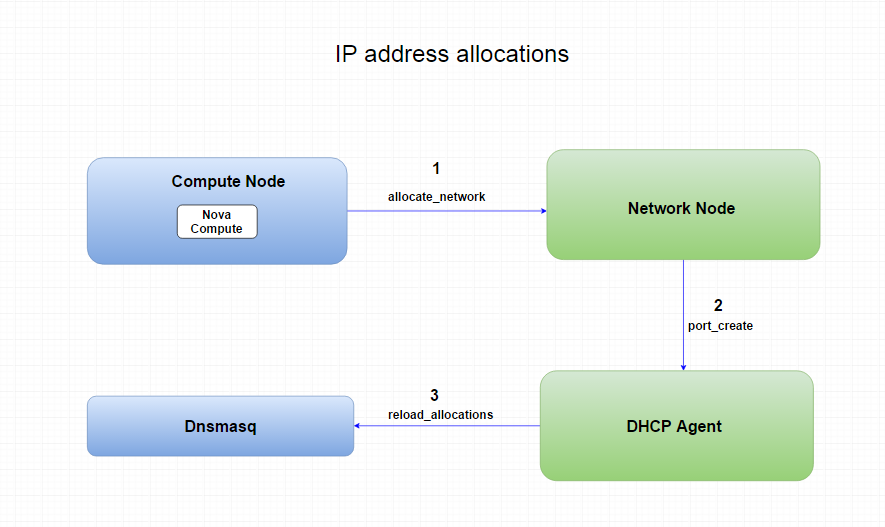
IP Address allocations


IP_address_allocations


AWS – Elastic MapReduce (Amazon ERM)

Amazon Elastic MapReduce (Amazon EMR) is a web service that makes it easy to quickly and cost-effectively process vast amounts of data.

Amazon EMR simplifies big data processing, providing a managed Hadoop framework that makes it easy, fast, and cost-effective for you to distribute and process vast amounts of your data across dynamically scalable Amazon EC2 instances. You can also run other popular distributed frameworks such as Apache Spark and Presto in Amazon EMR, and interact with data in other AWS data stores such as Amazon S3 and Amazon DynamoDB.

Amazon EMR securely and reliably handles your big data use cases, including log analysis, web indexing, data warehousing, machine learning, financial analysis, scientific simulation, and bioinformatics.

AWS Elastic Beanstalk

AWS Elastic Beanstalk – is the fastest and easy way to get an application up and running on AWS. Developers can simply upload their application code and the service automatically handles all the details, such a resource provisioning, load balancing, auto scaling, and monitoring.


AWS Elastic Beanstalk supports the following languages and developments stacks:

-Apache Tomcat for Java apps

-Apache HTTP Server for PHP applications

-Apache HTTP Server for Python applications

-Nngix or Apache HTTP Server for Node.js applications

– Microsoft IIS for .NE


Reference:

https://aws.amazon.com/faqs/