Amazon S3 is a simple key-based object store. When you store data, you assign a unique object key that can later be used to retrieve the data. Keys can be any string, and can be constructed to mimic hierarchical attributes.
Storage Classes
– Amazon S3 Standard
–Amazon S3 Standard – Infrequent Access
– Amazon Glacier
The total volume of data and number of objects you can store are unlimited. Individual Amazon S3 objects can range in size from a minimum of 0 bytes to a maximum of 5 terabytes.
The largest object that can be uploaded in a single PUT is 5 gigabytes. For objects larger than 100 megabytes, customers should consider using the Multipart Upload capability.
-Amazon S3 buckets in all Regions provide read-after-write consistency for PUTS of new objects and eventual consistency for overwrite PUTS and DELETES.
Amazon S3 provide multiple options to protect your data at rest
For customers who prefer to manage their own encryption, they can use a client encryption library like the Amazon S3 Encryption Client to encrypt data before you uploading to Amazon S3
- There are two ways of securing S3, using either Access Control Lists (Permissions) or by using bucket Policies.
Security
You can choose to encrypt data using SSE-S3, SSE-C, SSE-KMS, or a client library. All four enable you to store sensitive data encrypted at rest in Amazon S3.
- SSE-S3 provides an integrated solution where Amazon handles key management and key protection using multiple layers of security. You should choose SSE-S3 if you prefer to have Amazon manage your keys.
- SSE-C enables you to leverage Amazon S3 to perform the encryption and decryption of your objects while retaining control of the keys used to encrypt objects. With SSE-C, you don’t need to implement or use a client-side library to perform the encryption and decryption of objects you store in Amazon S3, but you do need to manage the keys that you send to Amazon S3 to encrypt and decrypt objects. Use SSE-C if you want to maintain your own encryption keys, but don’t want to implement or leverage a client-side encryption library.
- SSE-KMS enables you to use AWS Key Management Service (AWS KMS) to manage your encryption keys. Using AWS KMS to manage your keys provides several additional benefits. With AWS KMS, there are separate permissions for the use of the master key, providing an additional layer of control as well as protection against unauthorized access to your objects stored in Amazon S3. AWS KMS provides an audit trail so you can see who used your key to access which object and when, as well as view failed attempts to access data from users without permission to decrypt the data. Also, AWS KMS provides additional security controls to support customer efforts to comply with PCI-DSS, HIPAA/HITECH, and FedRAMP industry requirements.
Managing access permission to your S3 Resources
- S3 – ACL
- S3 – Bucket policy
- S3 – User Access policy
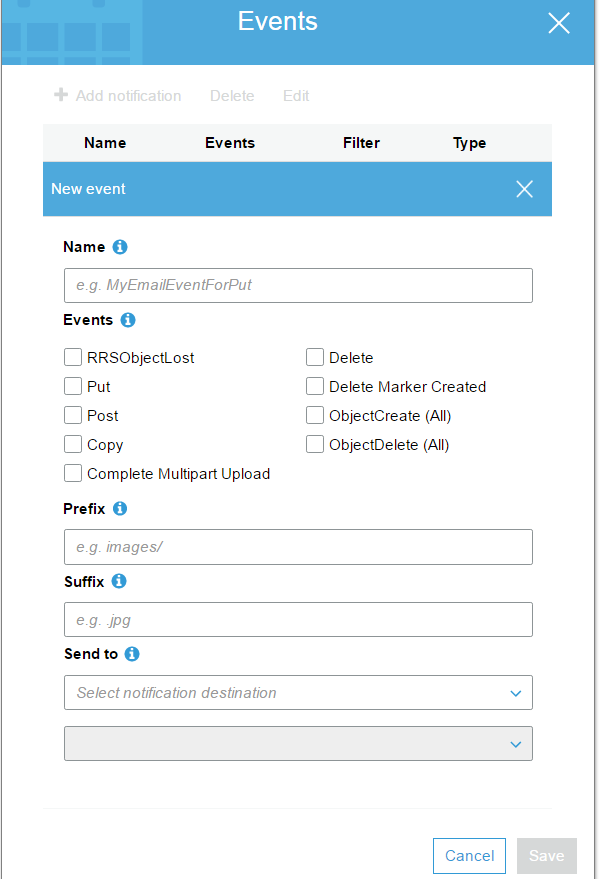
S3 Events Notification
S3 – Cross Region Replication
- Versioning must be enabled on both the source and destination
- Regions must be unique
- Delete markers are replicated
When uploading a large number of objects, customers sometimes use sequential numbers or date and time values as part of their key names. For example, you might choose key names that use some combination of the date and time, as shown in the following example, where the prefix includes a timestamp:
if you expect a rapid increase in the request rate for a bucket to more than 300 PUT/LIST/DELETE requests per second or more than 800 GET requests per second, we recommend that you open a case with AWS
VPC Endpoint for Amazon S3
 Infra Cloud Solutions