EC2 Container Service (ECS)

EC2 Container Service (ECS)

Amazon EC2 Container Service (Amazon ECS) is a highly scalable, fast, container management service that makes it easy to run, stop, and manage Docker containers on a cluster of Amazon Elastic Compute Cloud (Amazon EC2) instances. Amazon ECS lets you launch and stop container-based applications with simple API calls, allows you to get the state of your cluster from a centralized service, and gives you access to many familiar Amazon EC2 features

AWS Directory Services

AD Connector –  uses your existing on-premises Microsoft Active Directory to access AWS applications and services

Simple AD – is a Microsoft Active Directory – compatible directory that is powered by Samba 4 and hosted on the AWS cloud.

Simple AD is the least expensive option and your best choice if you have 5,000 or less users and don’t need the more advance Microsoft Active Directory

Amazon Cloud Directory

Amazon Cognito

Microsoft AD

iperf

Test Bandwidth on EC2 instances with iperf3

  1. Install iperf

[root@centos64 ~]# yum install iperf iperf3
Loaded plugins: fastestmirror, refresh-packagekit, security
Setting up Install Process
Loading mirror speeds from cached hostfile
* base: mirror2.evolution-host.com
* elrepo: ca.mirror.babylon.network
* epel: mirror.math.princeton.edu
* extras: centos.mirror.rafal.ca
* rpmforge: repoforge.mirror.constant.com
* updates: mirror2.evolution-host.com
Resolving Dependencies
–> Running transaction check
—> Package iperf.x86_64 0:2.0.5-11.el6 will be installed
—> Package iperf3.x86_64 0:3.0.12-1.el6 will be installed
–> Finished Dependency Resolution

Dependencies Resolved

================================================================================
Package          Arch             Version                 Repository      Size
================================================================================
Installing:
iperf            x86_64           2.0.5-11.el6            epel            53 k
iperf3           x86_64           3.0.12-1.el6            epel            65 k

Transaction Summary
================================================================================
Install       2 Package(s)

Total download size: 118 k
Installed size: 279 k
Is this ok [y/N]: y


Downloading Packages:
(1/2): iperf-2.0.5-11.el6.x86_64.rpm                                                                            |  53 kB     00:00
(2/2): iperf3-3.0.12-1.el6.x86_64.rpm                                                                           |  65 kB     00:00
—————————————————————————————————————————————
Total                                                                                                  445 kB/s | 118 kB     00:00
Running rpm_check_debug
Running Transaction Test
Transaction Test Succeeded
Running Transaction
Installing : iperf3-3.0.12-1.el6.x86_64                                                                                          1/2
Installing : iperf-2.0.5-11.el6.x86_64                                                                                           2/2
Verifying  : iperf-2.0.5-11.el6.x86_64                                                                                           1/2
Verifying  : iperf3-3.0.12-1.el6.x86_64                                                                                          2/2

Installed:
iperf.x86_64 0:2.0.5-11.el6                                       iperf3.x86_64 0:3.0.12-1.el6

Complete!
[root@centos64 ~]#


[root@centos64 ~]# iperf -s
————————————————————
Server listening on TCP port 5001
TCP window size: 85.3 KByte (default)
————————————————————

terraform

Terraform is a tool for building, changing, and versioning infrastructure safely and efficiently. Terraform can manage existing and popular service providers as well  as custom in-house solutions.

idempotent

Terraform have  three files with “tf” extension (Terraform extension):

  • main.tf: Code to create our resources and infrastructure.
  • variables.tf: Variables that will act as parameters for the main.tf file.
  • outputs.tf: Anything we might want returned from the resources created. For example: resource name, ID, and so on.

This makes it possible to use a value returned as a parameter for another function later.

1.Download terraform

https://www.terraform.io/downloads.html

Terraform state storage ( local vs remote)

2. Terraform commnads 

terraform version

terraform init

terraform fmt

terrafom validate

terraform plan

terraform apply   ( Deploy )

terraform apply -auto-aprove

terraform modules

configure Terraform backend – AWS S3 backend with Terraform

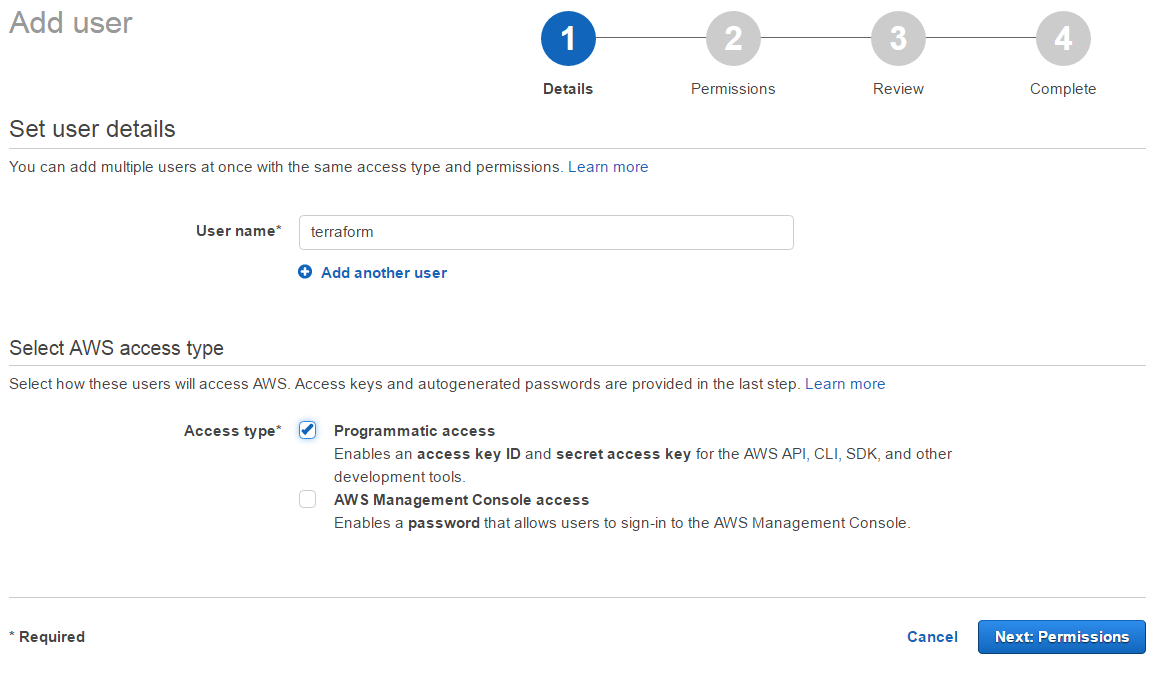
3. Configure Terraform on AWS 

eate a useradd_user

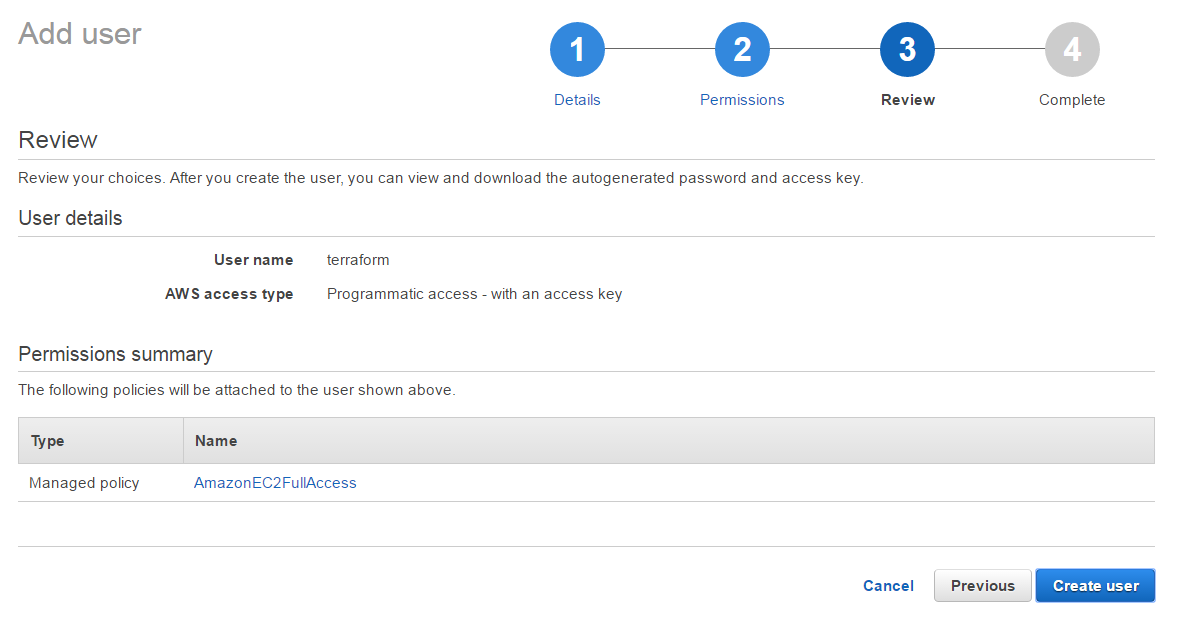
Attach policy to terraform user

attach_policy

[ovidiu@centos64 ~]$ ./terraform plan
Refreshing Terraform state in-memory prior to plan…
The refreshed state will be used to calculate this plan, but
will not be persisted to local or remote state storage.
The Terraform execution plan has been generated and is shown below.
Resources are shown in alphabetical order for quick scanning. Green resources
will be created (or destroyed and then created if an existing resource
exists), yellow resources are being changed in-place, and red resources
will be destroyed. Cyan entries are data sources to be read.

Note: You didn’t specify an “-out” parameter to save this plan, so when
“apply” is called, Terraform can’t guarantee this is what will execute.

+ aws_instance.webserver
ami: “ami-6869aa05”
associate_public_ip_address: “<computed>”
availability_zone: “<computed>”
ebs_block_device.#: “<computed>”
ephemeral_block_device.#: “<computed>”
instance_state: “<computed>”
instance_type: “t2.micro”
key_name: “<computed>”
network_interface_id: “<computed>”
placement_group: “<computed>”
private_dns: “<computed>”
private_ip: “<computed>”
public_dns: “<computed>”
public_ip: “<computed>”
root_block_device.#: “<computed>”
security_groups.#: “<computed>”
source_dest_check: “true”
subnet_id: “<computed>”
tenancy: “<computed>”
vpc_security_group_ids.#: “<computed>”
Plan: 1 to add, 0 to change, 0 to destroy.

[ovidiu@centos64 ~]$ ./terraform apply
aws_instance.webserver: Creating…
ami: “” => “ami-6869aa05”
associate_public_ip_address: “” => “<computed>”
availability_zone: “” => “<computed>”
ebs_block_device.#: “” => “<computed>”
ephemeral_block_device.#: “” => “<computed>”
instance_state: “” => “<computed>”
instance_type: “” => “t2.micro”
key_name: “” => “<computed>”
network_interface_id: “” => “<computed>”
placement_group: “” => “<computed>”
private_dns: “” => “<computed>”
private_ip: “” => “<computed>”
public_dns: “” => “<computed>”
public_ip: “” => “<computed>”
root_block_device.#: “” => “<computed>”
security_groups.#: “” => “<computed>”
source_dest_check: “” => “true”
subnet_id: “” => “<computed>”
tenancy: “” => “<computed>”
vpc_security_group_ids.#: “” => “<computed>”
aws_instance.webserver: Still creating… (10s elapsed)
aws_instance.webserver: Still creating… (20s elapsed)
aws_instance.webserver: Creation complete

Apply complete! Resources: 1 added, 0 changed, 0 destroyed.

The state of your infrastructure has been saved to the path
below. This state is required to modify and destroy your
infrastructure, so keep it safe. To inspect the complete state
use the `terraform show` command.

State path: terraform.tfstate
[ovidiu@centos64 ~]$

AWS – EFS

AWS – EFS

Amazon EFS is a fully-managed service that makes it easy to set up and scale file storage in the Amazon cloud

Amazon EFS is a file storage service for use with Amazon EC2. Amazon EFS provides a file system interface, file system access semantics (such as strong consistency and file locking), and concurrently-accessible storage for up to thousands of Amazon EC2 instances.

Amazon EBS is a block level storage service for use with Amazon EC2. Amazon EBS can deliver performance for workloads that require the lowest-latency access to data from a single EC2 instance.

Amazon S3 is an object storage service. Amazon S3 makes data available through an Internet API that can be accessed anywhere.


Amazon EFS uses the NFSv4.1 protocol

From AWS Console, go to EFS

Step 1 : Configure file system access
Step 2 : Configure optional settings
Step 3 : Review and create

An Amazon EFS file system is accessed by EC2 instances running inside one of your VPCs. Instances connect to a file system via a network interface called a mount target. Each mount target has an IP address, which we assign automatically or you can specify.

Create mount targets

Instances connect to a file system via mount targets you create. We recommend creating a mount target in each of your VPC’s Availability Zones so that EC2 instances across your VPC can access the file system.

Mount target – To access your file system, you must create mount targets in your VPC. Each mount target has the following properties: the mount target ID, the subnet ID in which it is created, the file system ID for which it is created, an IP address at which the file system may be mounted, and the mount target state. You can use the IP address or the DNS name in your mount command. Each mount target has a DNS name of the following form:

availability-zone.file-system-id.efs.aws-region.amazonaws.com 

On First EC2 Instance :

#yum install nfs-utils

Create a local directory ( e.g efs )

# mkdir efs

With mount command – mount the target you can use DNS or IP ( I use IP ) please see attached

#mount -t nfs4 -o nfsvers=4.1,rsize=1048576,wsize=1048576,hard,timeo=600,retrans=2 172.30.zzyy:/ /efs

[root@ efs]# df -h
Filesystem Size Used Avail Use% Mounted on
devtmpfs 992M 80K 992M 1% /dev
tmpfs 1002M 0 1002M 0% /dev/shm
/dev/xvda1 7.8G 1.2G 6.6G 15% /
/dev/xvdb 25G 2.5G 21G 11% /data
/dev/xvdh 79G 19G 56G 26% /data3
172.30.yy.zz:/ 8.0E 0 8.0E 0% /efs

[root@ efs]# ls -l /efs
total 16
drwxr-xr-x 2 root root 4096 Nov 14 20:44 data
drwxr-xr-x 2 root root 4096 Nov 14 20:43 data2
drwxr-xr-x 2 root root 4096 Nov 14 20:43 data3
drwxr-xr-x 2 root root 4096 Nov 14 19:09 test_efs
On second Ec2 instance
#yum install nfs-utils

mount target mount under local folder efs_2

#mount -t nfs4 -o nfsvers=4.1,rsize=1048576,wsize=1048576,hard,timeo=600,retrans=2 172.30.yy.zz:/ /efs_2

[root@ip-172-30 efs_2]# df -h
Filesystem Size Used Avail Use% Mounted on
devtmpfs 992M 68K 992M 1% /dev
tmpfs 1002M 0 1002M 0% /dev/shm
/dev/xvda1 7.8G 1.1G 6.7G 14% /
172.30.yy.zz:/ 8.0E 0 8.0E 0% /efs_2

[root@ /]# ls -l /efs_2/
total 16
drwxr-xr-x 2 root root 4096 Nov 14 20:44 data
drwxr-xr-x 2 root root 4096 Nov 14 20:43 data2
drwxr-xr-x 2 root root 4096 Nov 14 20:43 data3
drwxr-xr-x 2 root root 4096 Nov 14 19:09 test_efs

install boto

Boto is a Python package that provides interfaces to AWS including Amazon S3

boto – the AWS SDK for Python. Boto3 makes it easy to integrate your Python application, library, or script with AWS services including Amazon S3,

Amazon EC2, Amazon DynamoDB, and more.

[root@ip-172-…-126 ~]# pip list | grep boto
You are using pip version 6.1.1, however version 9.0.1 is available.
You should consider upgrading via the ‘pip install –upgrade pip’ command.
boto (2.42.0)
botocore (1.4.86)

[root@ip-172-30- ~]# pip install -U boto
You are using pip version 6.1.1, however version 9.0.1 is available.
You should consider upgrading via the ‘pip install –upgrade pip’ command.
Collecting boto
Downloading boto-2.43.0-py2.py3-none-any.whl (1.3MB)
100% |████████████████████████████████| 1.3MB 354kB/s
Installing collected packages: boto
Found existing installation: boto 2.42.0
Uninstalling boto-2.42.0:
Successfully uninstalled boto-2.42.0
Successfully installed boto-2.43.0


pip is a package management system used to install and manage software packages written in Python. Many packages can be found in the Python Package Index (PyPI). Python 2.7.9 and later (on the python2 series), and Python 3.4 and later include pip (pip3 for Python 3) by default.


[root@ip-172-30 ~]# pip install –upgrade pip
You are using pip version 6.1.1, however version 9.0.1 is available.
You should consider upgrading via the ‘pip install –upgrade pip’ command.
Collecting pip
Downloading pip-9.0.1-py2.py3-none-any.whl (1.3MB)
100% |████████████████████████████████| 1.3MB 372kB/s
Installing collected packages: pip
Found existing installation: pip 6.1.1
Uninstalling pip-6.1.1:
Successfully uninstalled pip-6.1.1
Successfully installed pip-9.0.1


/etc/boto.cfg
[root@ etc]# more boto.cfg
[Credentials]
aws_access_key_id = AKIA************************
aws_secret_access_key = oH7JxIljhY**************


simple script to upload a file to AWS S3

#!/usr/bin/python

import boto
from boto.s3.key import Key

keyId = “AKIA**************”
sKeyId= “eOCZ4********************”

fileName=”abcd.txt”
bucketName=”ovi-test”
file = open(fileName)

conn = boto.connect_s3(keyId,sKeyId)
bucket = conn.get_bucket(bucketName)

#Get the Key object of the bucket
k = Key(bucket)

#Crete a new key with id as the name of the file
k.key=fileName

#Upload the file
result = k.set_contents_from_file(file)
#result contains the size of the file uploaded

You can test if file was uploaded properly from aws cli

#aws s3 ls s3://ovi-test
PRE aws_doc/
PRE test/
2016-11-11 15:24:10 14 abcd.txt
2016-10-06 14:30:07 14 ovi2.txt
2016-10-06 12:01:16 13 test