Terraform is a tool for building, changing, and versioning infrastructure safely and efficiently. Terraform can manage existing and popular service providers as well as custom in-house solutions.
idempotent
Terraform have three files with “tf” extension (Terraform extension):
- main.tf: Code to create our resources and infrastructure.
- variables.tf: Variables that will act as parameters for the main.tf file.
- outputs.tf: Anything we might want returned from the resources created. For example: resource name, ID, and so on.
This makes it possible to use a value returned as a parameter for another function later.
1.Download terraform
https://www.terraform.io/downloads.html
Terraform state storage ( local vs remote)
2. Terraform commnads
terraform version
terraform init
terraform fmt
terrafom validate
terraform plan
terraform apply ( Deploy )
terraform apply -auto-aprove
terraform modules
configure Terraform backend – AWS S3 backend with Terraform
3. Configure Terraform on AWS
eate a user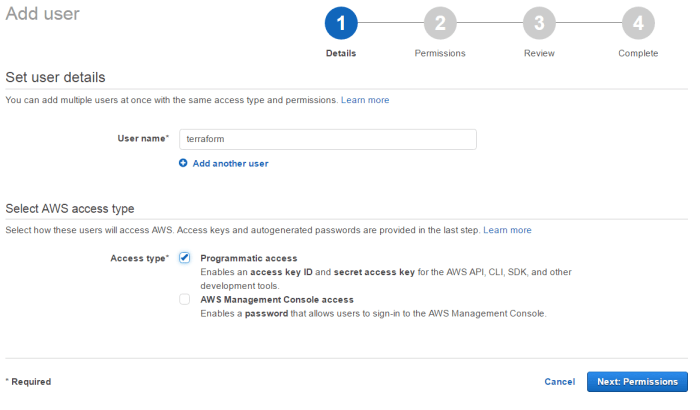
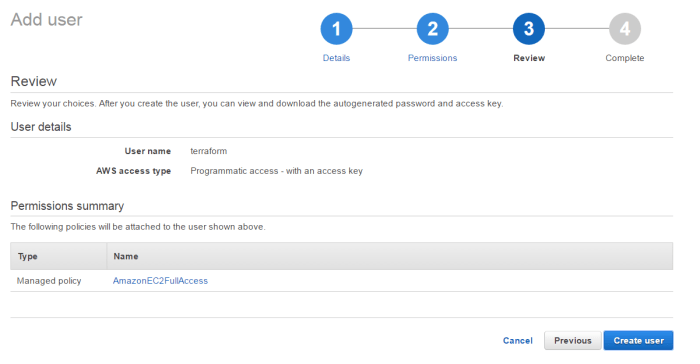
Attach policy to terraform user
[ovidiu@centos64 ~]$ ./terraform plan
Refreshing Terraform state in-memory prior to plan…
The refreshed state will be used to calculate this plan, but
will not be persisted to local or remote state storage.
The Terraform execution plan has been generated and is shown below.
Resources are shown in alphabetical order for quick scanning. Green resources
will be created (or destroyed and then created if an existing resource
exists), yellow resources are being changed in-place, and red resources
will be destroyed. Cyan entries are data sources to be read.
Note: You didn’t specify an “-out” parameter to save this plan, so when
“apply” is called, Terraform can’t guarantee this is what will execute.
+ aws_instance.webserver
ami: “ami-6869aa05”
associate_public_ip_address: “<computed>”
availability_zone: “<computed>”
ebs_block_device.#: “<computed>”
ephemeral_block_device.#: “<computed>”
instance_state: “<computed>”
instance_type: “t2.micro”
key_name: “<computed>”
network_interface_id: “<computed>”
placement_group: “<computed>”
private_dns: “<computed>”
private_ip: “<computed>”
public_dns: “<computed>”
public_ip: “<computed>”
root_block_device.#: “<computed>”
security_groups.#: “<computed>”
source_dest_check: “true”
subnet_id: “<computed>”
tenancy: “<computed>”
vpc_security_group_ids.#: “<computed>”
Plan: 1 to add, 0 to change, 0 to destroy.
[ovidiu@centos64 ~]$ ./terraform apply
aws_instance.webserver: Creating…
ami: “” => “ami-6869aa05”
associate_public_ip_address: “” => “<computed>”
availability_zone: “” => “<computed>”
ebs_block_device.#: “” => “<computed>”
ephemeral_block_device.#: “” => “<computed>”
instance_state: “” => “<computed>”
instance_type: “” => “t2.micro”
key_name: “” => “<computed>”
network_interface_id: “” => “<computed>”
placement_group: “” => “<computed>”
private_dns: “” => “<computed>”
private_ip: “” => “<computed>”
public_dns: “” => “<computed>”
public_ip: “” => “<computed>”
root_block_device.#: “” => “<computed>”
security_groups.#: “” => “<computed>”
source_dest_check: “” => “true”
subnet_id: “” => “<computed>”
tenancy: “” => “<computed>”
vpc_security_group_ids.#: “” => “<computed>”
aws_instance.webserver: Still creating… (10s elapsed)
aws_instance.webserver: Still creating… (20s elapsed)
aws_instance.webserver: Creation complete
Apply complete! Resources: 1 added, 0 changed, 0 destroyed.
The state of your infrastructure has been saved to the path
below. This state is required to modify and destroy your
infrastructure, so keep it safe. To inspect the complete state
use the `terraform show` command.
State path: terraform.tfstate
[ovidiu@centos64 ~]$
 Infra Cloud Solutions