OpenStack

root@osc:~# glance –version
0.14.0

root@osc:~# neutron –version
2.3.8

root@osc:~# nova –version
2.19.0


root@osc:~# nova service-list
+—-+——————+——+———-+———+——-+—————————-+—-+
| Id    | Binary               | Host | Zone     | Status | State | Updated_at | Disabled Reason |
+—-+——————+——+———-+———+——-+—————————-+—–+
| 1 | nova-cert                | osc | internal | enabled | up | 2016-07-28T12:48:15.000000 | – |
| 2 | nova-consoleauth | osc | internal | enabled | up | 2016-07-28T12:48:21.000000 | – |
| 3 | nova-scheduler  | osc | internal | enabled | up | 2016-07-28T12:48:15.000000 | – |
| 4 | nova-conductor | osc | internal | enabled | up | 2016-07-28T12:48:21.000000 | – |
| 5 | nova-compute    | n1   | nova      | enabled | up | 2016-07-28T12:47:25.000000 | – |
+—-+——————+——+———-+———+——-+—————————-+—-+


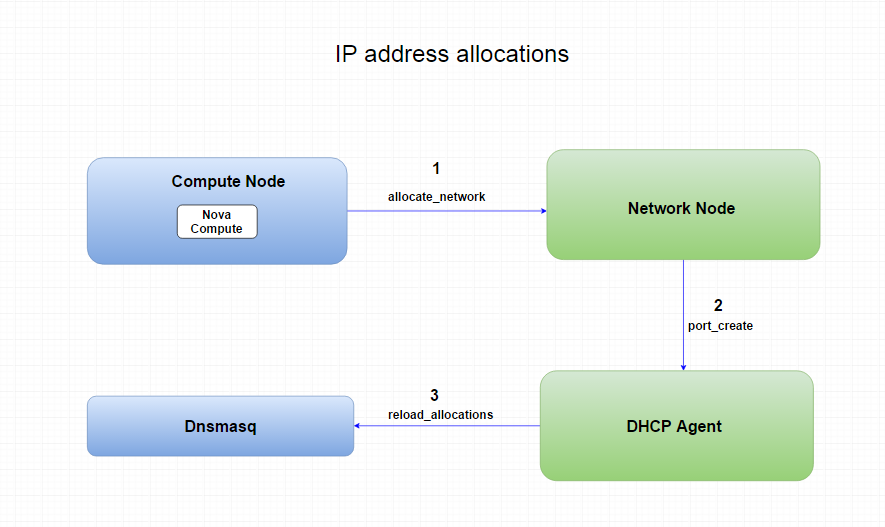
IP Address allocations


IP_address_allocations


AWS – Elastic MapReduce (Amazon ERM)

Amazon Elastic MapReduce (Amazon EMR) is a web service that makes it easy to quickly and cost-effectively process vast amounts of data.

Amazon EMR simplifies big data processing, providing a managed Hadoop framework that makes it easy, fast, and cost-effective for you to distribute and process vast amounts of your data across dynamically scalable Amazon EC2 instances. You can also run other popular distributed frameworks such as Apache Spark and Presto in Amazon EMR, and interact with data in other AWS data stores such as Amazon S3 and Amazon DynamoDB.

Amazon EMR securely and reliably handles your big data use cases, including log analysis, web indexing, data warehousing, machine learning, financial analysis, scientific simulation, and bioinformatics.

AWS Elastic Beanstalk

AWS Elastic Beanstalk – is the fastest and easy way to get an application up and running on AWS. Developers can simply upload their application code and the service automatically handles all the details, such a resource provisioning, load balancing, auto scaling, and monitoring.


AWS Elastic Beanstalk supports the following languages and developments stacks:

-Apache Tomcat for Java apps

-Apache HTTP Server for PHP applications

-Apache HTTP Server for Python applications

-Nngix or Apache HTTP Server for Node.js applications

– Microsoft IIS for .NE


Reference:

https://aws.amazon.com/faqs/

AWS – Cloud HSM

The AWS CloudHSM service helps you meet corporate, contractual and regulatory compliance requirements for data security by using dedicated Hardware Security Module (HSM) appliances within the AWS cloud.

CloudHSM complements existing data protection solutions and allows you to protect your encryption keys within HSMs that are designed and validated to government standards for secure key management. CloudHSM allows you to securely generate, store and manage cryptographic keys used for data encryption in a way that keys are accessible only by you.

– use CloudHSM to store keys or encrypt data used by other AWS services?

You can write custom applications and integrate them with CloudHSM, or you can leverage one of the third party encryption solutions available from AWS Technology Partners. Examples include EBS volume encryption and S3 object encryption and key management.


– other AWS services use CloudHSM to store and manage keys
Amazon  (RDS) for Oracle Database and Amazon Redshift can be configured to store master keys in CloudHSM instances.

AWS – Auto Scaling

Auto Scaling helps you to maintain application availability and allows you to scale your Amazon EC2 capacity up or down automatically according to condition to define

Steps to create an Auto Scaling

  1. Create an Auto Scaling Group
  2. Configure your Auto Scaling Group
  3. Add an Elastic Load Balancer ( Optional)
  4. Configure Scaling Policies

Auto-scaling improves availability and will keep your infrastructure at the size needed to run your application.

Auto Scaling Components 

Groups 

Launch Configuration 

Your Group uses a lunch configuration as a template for its EC2 instances . When you create a lunch configuration, you can specify information such as :

  • AMI ID
  • instance type
  • key pair
  • security groups
  • block device mapping for your instance

When you create an Auto Scaling Group, you must specify the lunch configuration . You can specify your lunch configuration with multiple Auto Scaling Groups

You can’t modify a lunch configuration after you’ve created it 

Scaling Plans 

A scaling plan tells Auto Scaling when and how to scale . For example, you can base a scaling plan on the occurrence of specific conditions ( dynamic scaling ) or an a schedule.


Attach EC2 Instances to Your Auto Scaling Group

Auto Scaling provides you with an option to Enable Auto Scaling Group for one or more EC2 Instances by attaching them to your existing Auto Scaling Group. After the instances are attached they become part of Auto Scaling group

The instance that you want attach must meet the following criteria

  • the instance is in the running state
  • The AMI used the lunch instance must still exist
  • The instance is not a member of Auto Scaling group
  • The instance is in a same Availability Zone as the Auto Scaling Group
  • If the Auto Scaling Group has an attached load balancer, the instance and the load balancer must both be in EC2- Classic or the same VPC


Auto Scaling lifecycle hooks enable you to perform custom actions as Auto Scaling launches or terminate instances . For example, you could install or configure software on newly lunched instances, or download log files from an instance before is terminates.

Adding lifecycle hooks to Auto Scaling group gives you a grater control over how instance launch and terminate . Here is some things to consider when adding a lifecycle hook to your Auto Scaling, to help ensure that group continues to perform as expected.

considerations :

  • keep instance in a wait state
  • cooldowns and custom actions
  • health check grace period
  • Lifecycle Action Result
  • Spot Instances

When we create an Auto Scaling group, we must specify a launch configuration, and we can only specify one for an auto scaling group at a time.

you can only specify one launch configuration for an Auto Scaling group at a time, and you can’t modify a launch configuration after you’ve created it

AWS – Resource Group

In Amazon Web Services, a resource is an entity that you can work with, such as an Amazon Elastic Compute Cloud (Amazon EC2) instance, an AWS CloudFormation stack, an Amazon Simple Storage Service (Amazon S3) bucket, and so on. If you oversee more than one of these resources, you might find it useful to manage them as a group rather than move from one AWS service to another for each task.

-With the Resource Groups tool, you use a single page to view and manage your resources

AWS – CloudFront

Amazon CloudFront is a global content delivery network (CDN) service that accelerates delivery of your websites, APIs, video content or other web assets. It integrates with other Amazon Web Services products to give developers and businesses an easy way to accelerate content to end users with no minimum usage commitments.

Edge Locations are used in conjunction with the AWS CloudFront service which is Content Delivery Network service. Edge Locations are deployed across the world in multiple locations to reduce latency for traffic served over the CloudFront and as result are usually located in highly populated areas

Amazon CloudFront is optimized to work with other AWS services, like Amazon S3, Amazon EC2, ELB, and Amazon Route 53

– Copy of the static content ( e.g. , images, css files, streaming  of prerecording video) and dynamic content ( e.g., html response, live video ) can be cached at Amazon CloudFront, which is content delivery network (CDN) consisting of multiple edge location around the world. Edge caching allows content to be served by infrastructure that is closer to viewers, lowering latency and giving you the high data transfer rates.

CloudFront – 2 types of distribution HTTP/HTTPS (WEB) and RTMP ( Streaming )

AWS – DynamoDB

DynamoDB – is a NoSQL database service by AWS designed for fast processing of small data, which dynamically grows and changes

Usage

  • Gaming: high-scores, world changes, player status and statistics
  • Advertising services :
  • Messaging and blogging
  • Data blocks systematization and processing

Your data is automatically replicated among 3 AZ within the selected region

  • There is no limit to the amount of data you can store in an Amazon DynamoDB table. As the size of your data set grows, Amazon DynamoDB will automatically spread your data over sufficient machine resources to meet your storage requirements.
  • To achieve high uptime and durability, Amazon DynamoDB synchronously replicates data across three facilities within an AWS Region.


Amazon DynamoDB supports two types of secondary indexes:

  • Local secondary index — an index that has the same partition key as the table, but a different sort key. A local secondary index is “local” in the sense that every partition of a local secondary index is scoped to a table partition that has the same partition key.
  • Global secondary index — an index with a partition or a partition-and-sort key that can be different from those on the table. A global secondary index is considered “global” because queries on the index can span all items in a table, across all partitions.

Global secondary indexes are indexes that contains a partition or partition-and-short keys that can be different from the table’s primary key.

DynamoDB cross-region replication allows you to maintain identical copies (called replicas) of a DynamoDB table (called master table) in one or more AWS regions. After you enable cross-region replication for a table, identical copies of the table are created in other AWS regions. Writes to the table will be automatically propagated to all replicas.

If you wish to exceed throughput rates of 10,000 writes/second or 10,000 reads/second, you must first contact Amazon

DynamoDB data is automatically replicated across multiple AZs

DynamoDB allow for the storage of large text and binary objects, but there is a limit


DynamoDB cross-region replication allows you to maintain identical copies (called replicas) of a DynamoDB table (called master table) in one or more AWS regions. After you enable cross-region replication for a table, identical copies of the table are created in other AWS regions. Writes to the table will be automatically propagated to all replicas.

-Strong Consistency

Atomic counter

DynamoDB supports atomic counters, where you use the updateItem method to increment or decrement the value of an existing attribute without interfering with others write request. ( All write request are applied in the order in which there were received)

Conditional writes

PutItem, DeleteItem, UpdateItem

Conditional writes are idempotent – that mean you can send the same conditional write request multiple times, but it will have no future effect on the item after the first time DynamoDB performs the specific update .

Batch Operations

If your application needs to read multiple items, you can use BatchGetItem. A single BatchGetItem request can retrieve up to 16 MB of data, which can contains as many as 100 items.

DynamoDB supports eventually consistent and strongly consistent reads .

Eventually consistent reads 

When you read data from a DynamoDB table, the response might not reflect the results of recently completed writhe operations. The response might include some stale data. If you repeat your read request after a short time , the response should return the latest data.

Strongly consistent Reads

When you request strongly consistent read, DynamoDB returns a response with the most up-to-date data, reflecting the updates from all prior write operations that where successful. A strongly consistent read might not be available in the case of network delay or outage.

DynamoDB uses eventually consistent reads, unless you specify otherwise. Read operations ( such as GetItem, Query, and Scan )provide a ConsistentRead parameter: if you set this parameter to true, DynamoDB will use strongly consistent reads during the operation.


Units of Capacity required for writes = Number of item writes per second x item size in 1KB blocks

Units of Capacity required for reads* = Number of item reads per second x item size in 4KB blocks

* If you use eventually consistent reads you’ll get twice the throughput in terms of reads per second.

Error Components :

An HTTP code 200 – success

An HTTP code 400 – indicate a problem with your request ( client error)

e.g authentication failure, missing required parameters, or exceeding table’s provisioned throughput

Ann HTTP  code 5xx – status code indicates a problem that mus be resolved by Amazon Web Services

Optimistic locking is a strategy to ensure that the client-side item that you are updating (or deleting) is the same as the item in DynamoDB. If you use this strategy, then your database writes are protected from being overwritten by the writes of others — and vice-versa.

-DynamoDB supports nested attributes up to 32 levels deep.


Reference

http://aws.amazon.com/faqs
AWS – Route 53

Amazon Route 53 is a highly available and scalable cloud Domain Name System (DNS) web service.

Amazon Route 53 effectively connects user requests to infrastructure running in AWS – such as Amazon EC2 instances, Elastic Load Balancing load balancers, or Amazon S3 buckets – and can also be used to route users to infrastructure outside of AWS. You can use Amazon Route 53 to configure DNS health checks to route traffic to healthy endpoints or to independently monitor the health of your application and its endpoints.

Amazon Route 53 Traffic Flow makes it easy for you to manage traffic globally through a variety of routing types, including Latency Based Routing, Geo DNS, and Weighted Round Robin—all of which can be combined with DNS Failover in order to enable a variety of low-latency, fault-tolerant architectures. Using Amazon Route 53 Traffic Flow’s simple visual editor, you can easily manage how your end-users are routed to your application’s endpoints—whether in a single AWS region or distributed around the globe. Amazon Route 53 also offers Domain Name Registration – you can purchase and manage domain names such as example.com and Amazon Route 53 will automatically configure DNS settings for your domains.

Amazon Route 53 currently supports the following DNS record types:

  • TXT (text record)
  • SRV (service locator)
  • SPF (sender policy framework)
  • SOA (start of authority record)
  • PTR (pointer record)
  • NS (name server record)
  • MX (mail exchange record)
  • CNAME (canonical name record)
  • AAAA (IPv6 address record)
  • A (address record)
  • Additionally, Amazon Route 53 offers ‘Alias’ records (an Amazon Route 53-specific virtual record). Alias records are used to map resource record sets in your hosted zone to Amazon Elastic Load Balancing load balancers, Amazon CloudFront distributions, AWS Elastic Beanstalk environments, or Amazon S3 buckets that are configured as websites. Alias records work like a CNAME record in that you can map one DNS name (example.com) to another ‘target’ DNS name (elb1234.elb.amazonaws.com). They differ from a CNAME record in that they are not visible to resolvers. Resolvers only see the A record and the resulting IP address of the target record.


Amazon Route 53 does not support DNSSEC at this time.

Amazon Route 53 offers a special type of record called an ‘Alias’ record that lets you map your zone apex (example.com) DNS name to your ELB DNS name (i.e.elb1234.elb.amazonaws.com). IP addresses associated with Amazon Elastic Load Balancers can change at any time due to scaling up, scaling down, or software updates. Route 53 responds to each request for an Alias record with one or more IP addresses for the load balancer. Queries to Alias records that are mapped to ELB load balancers are free. These queries are listed as “Intra-AWS-DNS-Queries” on the Amazon Route 53 usage report.

Route53 has a security feature that prevents internal DNS being read be external sources. The work around is to create a EC2 hosted DNS instance that does zone transfers from the internal DNS, and allows it’self to be queried by external servers

DNS Routing Policy 

  • Weighted Round Robin (WRR)
  • Latency Based Routing (LBR)

Amazon – Kinesis

Amazon Kinesis Streams enables you to build custom applications that process or analyze streaming data for specialized needs. Amazon Kinesis Streams can continuously capture and store terabytes of data per hour from hundreds of thousands of sources such as website clickstreams, financial transactions, social media feeds, IT logs, and location-tracking events. With Amazon Kinesis Client Library (KCL), you can build Amazon Kinesis Applications and use streaming data to power real-time dashboards, generate alerts, implement dynamic pricing and advertising, and more. You can also emit data from Amazon Kinesis Streams to other AWS services such as Amazon Simple Storage Service (Amazon S3), Amazon Redshift, Amazon Elastic Map Reduce (Amazon EMR), and AWS Lambda.